


Ultimate Guide to Personalized Recommendation Testing
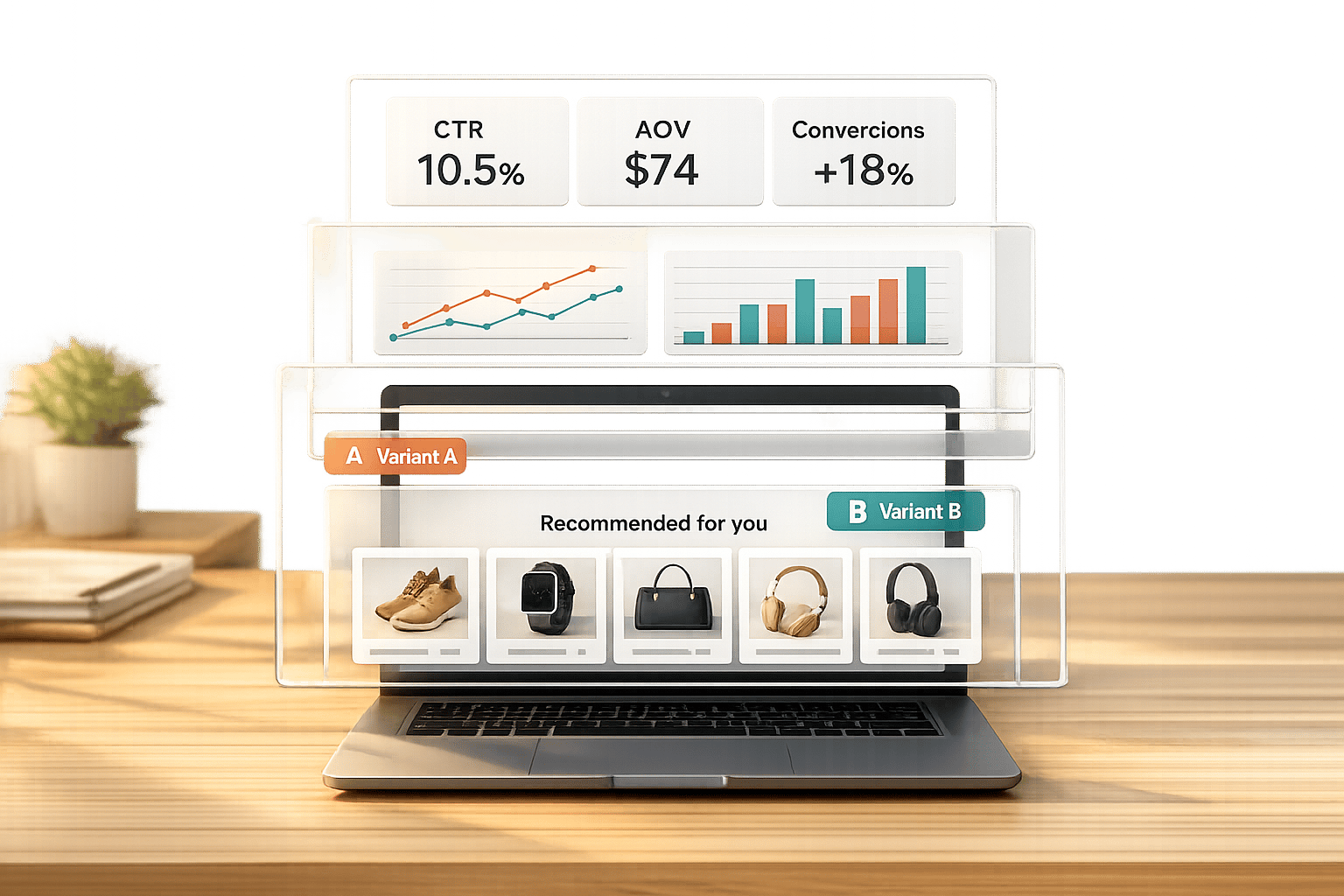
Ultimate Guide to Personalized Recommendation Testing
 09-03-2026 (Last modified: 10-03-2026)
Personalized product recommendations are a game-changer for e-commerce, driving up to 35% of sales on platforms like Amazon. But not all strategies work equally well. Testing is the key to finding what resonates with your audience – whether it’s “Frequently Bought Together” bundles or “Because You Watched” suggestions. This article breaks down how to test and optimize these recommendations effectively.
Here’s what you’ll learn:
- How recommendations work: Algorithms like collaborative filtering, content-based filtering, and hybrid approaches.
- Why testing matters: Shoppers who click on recommendations are 70% more likely to convert, but strategies vary by audience and placement.
- Metrics to track: Focus on click-through rate (CTR), conversion rate, and average order value (AOV).
- Testing tools: Platforms like PageTest.AI let you test recommendations without coding.
Key takeaway: Testing helps you fine-tune recommendations to increase site conversion and improve the shopping experience. Even small changes, like adjusting placement or messaging, can lead to big results.
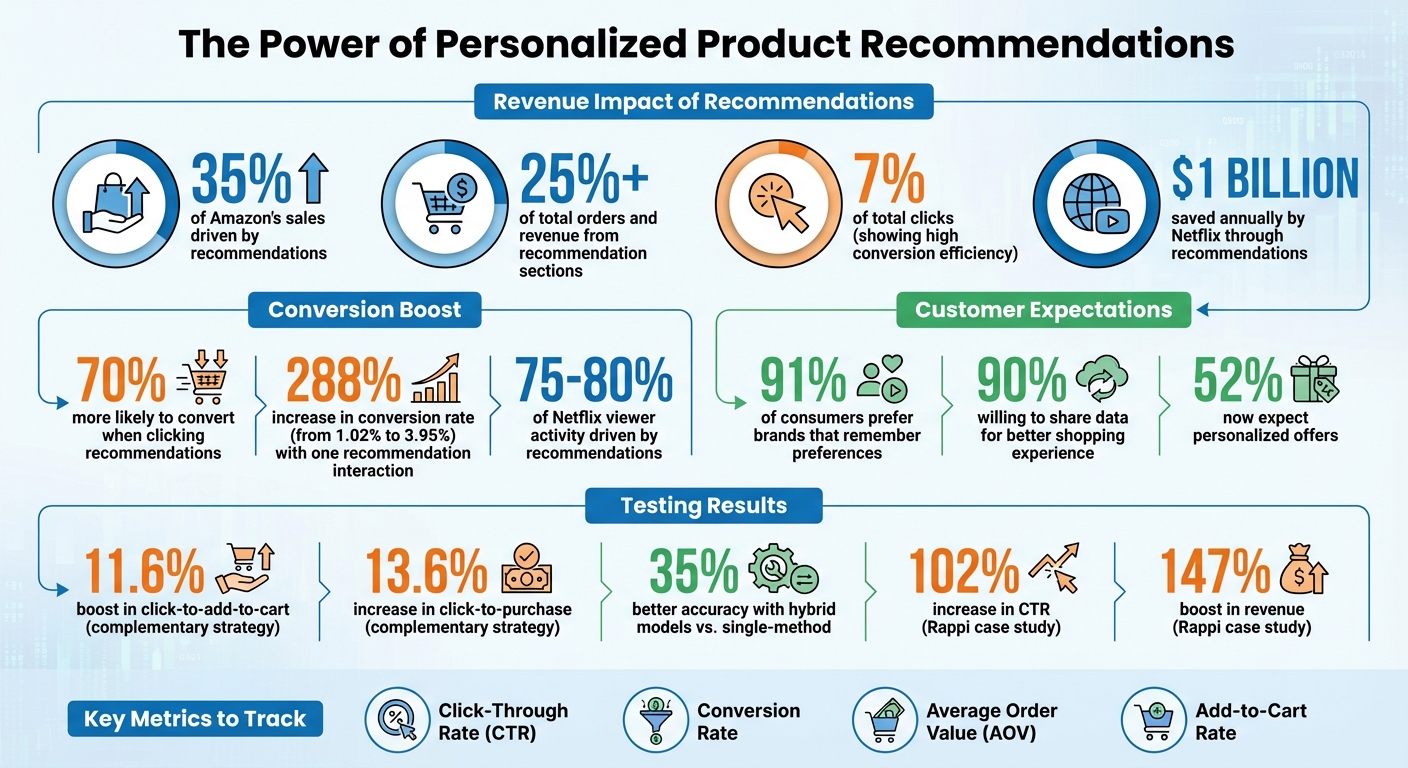
Personalized Product Recommendations Impact: Key Statistics and Performance Metrics
AI Powers Recommendation System | E-Commerce Recommendation System Using Gen AI
sbb-itb-6e49fcd
What Are Personalized Product Recommendations?
Personalized product recommendations are smart, automated suggestions based on your browsing habits, past purchases, and even what you’re doing in real time. They’re designed to predict what you’ll want next, making shopping not just easier but also more engaging.
Unlike the generic lists you often see, like “Best Sellers” or “Trending Products”, these recommendations use your specific data to create suggestions that feel tailor-made for you. It’s what makes online shopping feel personal.
The impact of these systems is undeniable. Take Netflix, for example – their recommendation engine helps 80% of viewers find new shows or movies, saving the company over $1 billion every year by keeping customers happy and engaged. On the e-commerce side, shoppers who interact with just one recommendation see their conversion rates leap from 1.02% to 3.95% – a massive 288% increase.
But it’s not just about boosting sales. Personalized recommendations also tackle the problem of decision fatigue. With so many options available, it’s easy to feel overwhelmed. AI-driven suggestions simplify the process, guiding customers toward what they need. In fact, 90% of shoppers are willing to share their data if it means a smoother shopping experience.
How Recommendation Systems Work
Here’s a simplified look at how these systems operate:
- Data Collection: First, the system gathers information about you – your interactions, shopping history, demographics, and even what you do during a browsing session.
- Data Analysis: Next, algorithms process this data, identifying patterns. They might use collaborative filtering (finding users with similar preferences) or content-based filtering (matching product features to your likes).
- Feature Engineering: The system pinpoints specific attributes, like whether you prefer sleek designs or bold colors, to refine its suggestions.
- Prediction: Based on these patterns, the system predicts which items you’re likely to be interested in.
- Delivery: Finally, these tailored recommendations are displayed in real time – whether on product pages, in your cart, or through emails and notifications.
Modern systems continuously update their suggestions based on your actions. For instance, if you browse a laptop, then a bag, and then a mouse, the algorithm might predict your next step and suggest related items.
“The shift from rule-based systems to AI-driven contextual engines marks the single most important upgrade an e-commerce platform can make. It’s the difference between a megaphone and a one-on-one conversation.” – Webbb.ai
Common Types of Product Recommendations
Different types of recommendations serve different purposes throughout your shopping journey:
- Customers Also Bought: Shows items that other shoppers purchased together, using collaborative filtering.
- Recommended for You: Combines your behavior with product details for highly personalized suggestions.
- Frequently Bought Together: Highlights complementary products, like a phone case and screen protector for a new smartphone.
- Based on Your Browsing History: Matches products to what you’ve previously viewed using content-based filtering.
- Trending in Your Area: Adds a social element by showcasing popular items among shoppers like you.
For first-time visitors, systems often rely on popularity-based suggestions like “Best Sellers” or “New Arrivals” until they gather enough data to make more personalized recommendations.
One standout example of how effective these systems can be comes from Med&Beauty. In 2026, they used AI-powered recommendations in just 10 email campaigns and generated $43,000 in sales. As CEO Szymon Grocholewski put it, “We generated $43,000 in sales with just 10 emails using GetResponse”.
These different recommendation types offer a solid foundation for testing and refining your e-commerce strategy. By understanding how they work, you can make smarter decisions about how to use them. This often involves multivariate AB testing to determine which recommendation logic performs best for your specific audience.
Why Test Your Product Recommendations
Testing product recommendations plays a crucial role in driving revenue. While recommendations can significantly influence sales, not every approach works equally well. What resonates with one audience or product category might completely miss the mark with another. Testing eliminates guesswork, allowing customer behavior to guide decision-making and reveal what truly works.
The numbers speak for themselves: online shoppers who click on recommendations are 70% more likely to convert. Even though recommendation sections might only account for about 7% of total clicks, they can drive over 25% of total orders and revenue. This disconnect between clicks and revenue underscores the potential of a well-optimized recommendation strategy.
“A/B testing is that reality check. It’s the difference between thinking your recommendations are brilliant and actually knowing they work.” – The Statsig Team
Testing also ensures your strategy evolves with customer preferences. What worked last year might fall flat today as trends shift and expectations change. Regular testing keeps your recommendations relevant, avoiding the risk of frustrating or alienating customers. Let’s dive into how testing can optimize for conversions and elevate the shopping experience.
Improving Conversion Rates
Testing different recommendation strategies is key to identifying what drives purchases. For example, in July 2025, Constructor’s Data Science team, led by Nate Roy, ran A/B tests comparing two approaches: a “complementary” strategy (suggesting accessories) and an “alternative” strategy (suggesting similar items). The results were clear: the complementary approach led to an 11.6% boost in “click-to-add-to-cart” actions and a 13.6% increase in “click-to-purchase” actions, outperforming the alternative strategy, which only saw an 8.1% increase in clicks.
Placement matters too. Testing can help you pinpoint the most effective locations for recommendations. For instance, recommendations on Product Detail Pages (PDPs) typically account for 60–70% of the direct revenue generated by a recommendation program. By testing placements – whether on the homepage, PDPs, or in the shopping cart – you can focus your efforts where they’ll deliver the greatest results.
“Product recommendations can make the difference between a single-item purchase and a full cart.” – Nate Roy, Product Discovery Expert, Constructor
Different customer segments also respond to different tactics. For example, new visitors may gravitate toward “bestsellers”, while returning customers often prefer personalized picks based on their browsing history. Testing allows you to tailor your strategy to each group, maximizing conversions across your audience.
Creating Better Shopping Experiences
Beyond boosting conversions, testing helps refine the overall shopping experience. A staggering 91% of consumers say they’re more likely to shop with brands that remember their preferences and provide relevant recommendations. On the flip side, irrelevant suggestions can frustrate customers and drive them away.
Through testing, you can determine whether showing complementary products (like a phone case with a smartphone) or alternative products (like other smartphone models) is more effective in reducing friction at critical moments in the purchase journey.
Balancing personalization with performance is equally important. While 52% of customers now expect personalized offers, overly complex recommendation widgets can slow down page load times or clutter the interface. Monitoring secondary metrics like page load speed and bounce rate alongside conversion rates ensures that your recommendations are both relevant and user-friendly.
“By A/B testing product recommendations, retailers essentially allow their customers to ‘vote with their actions’ on what recommendation strategy is most effective.” – Alasdair Hamilton, CEO, Awayco
Recommendation Algorithms You Can Test
The right recommendation algorithm can make all the difference in helping customers discover relevant products. AB testing for websites can reveal which recommendation approach delivers the best conversion results. There are three primary types to consider: collaborative filtering, content-based filtering, and hybrid approaches. Each tackles unique challenges and offers distinct advantages.
- Collaborative filtering taps into the “wisdom of the crowd”, recommending products based on what similar users have purchased or viewed.
- Content-based filtering focuses on product attributes, suggesting items that align with a customer’s past interests.
- Hybrid approaches combine both techniques to improve accuracy and address the limitations of using just one.
“While collaborative filtering focuses on user similarity to recommend items, content-based filtering recommends items exclusively according to item profile features”.
This fundamental difference influences when and where each method shines. Below, we’ll break down these approaches, their benefits, challenges, and how they’ve been applied in real-world scenarios.
Collaborative Filtering
Collaborative filtering relies on patterns in user behavior. For example, if two customers share several purchases and one buys something new, the system might suggest that item to the other. Amazon famously used item-to-item collaborative filtering to manage its massive catalog, with its “Customers who bought this also bought” feature driving an estimated 35% of the company’s total revenue.
This method works best when you have a wealth of user interaction data – like clicks, purchases, or views. However, it struggles with the cold start problem, where new products or users lack sufficient data to generate recommendations.
Content-Based Filtering
Content-based filtering takes a different approach by analyzing product attributes such as category, price, color, or brand. For example, if someone browses a red leather handbag, the system might suggest similar handbags or related accessories based on shared features.
This method excels with new product launches or niche catalogs where user interaction data is limited. Since recommendations are based on product metadata, items can be suggested as soon as they’re added to the catalog. However, a major drawback is the creation of filter bubbles, where customers are only shown items closely aligned with their past preferences, potentially limiting discovery of new categories.
Hybrid Approaches
Hybrid systems merge multiple algorithms to harness the strengths of each while compensating for their weaknesses. For instance, a hybrid model might use content-based filtering for new users or products, then switch to collaborative filtering as interaction data accumulates. Some systems even blend both approaches simultaneously, weighing the confidence level of each method.
Netflix’s recommendation engine is a standout example of this approach. By combining collaborative and content-based filtering, Netflix drives 75–80% of viewer activity, saving over $1 billion annually through reduced customer churn. In 2024, hybrid and ensemble techniques accounted for 43.91% of the market share, cementing their role as the go-to choice for accuracy.
Another success story comes from Rappi, a Latin American delivery service. In 2023, Rappi partnered with Amazon Personalize to implement a hybrid “Just For You” feature. By analyzing real-time user behavior across multiple algorithms, Rappi saw a 102% increase in click-through rates and a 147% boost in revenue from personalized recommendations.
While hybrid systems deliver impressive accuracy – up to 35% better than single-method models – they require significant engineering resources and machine learning expertise to develop and maintain. For established e-commerce platforms, however, the investment often pays off through improved performance and revenue growth.
| Algorithm Type | Best For | Data Requirement | Main Weakness |
|---|---|---|---|
| Collaborative | Discovery & cross-selling | High (user interactions) | Cold start problem |
| Content-Based | New items & niche catalogs | Low (product metadata) | Filter bubbles |
| Hybrid | Maximum accuracy | Medium to high | Technical complexity |
With these algorithms in mind, the next step is to explore the metrics that will help you measure the success of your tests.
Metrics to Track in Personalized Recommendation Testing
After diving into recommendation algorithms, the next step is figuring out how to measure their success. The metrics you choose can make or break your ability to fine-tune and validate your strategies. Beyond recommendations, there are many other elements you can A/B test to improve your site’s performance. The trick is to focus on metrics that directly affect your revenue while also paying attention to those that offer valuable context.
Core Metrics
Four key metrics – CTR, conversion rate, average order value (AOV), and add-to-cart rate – are essential for evaluating recommendation tests. These metrics cover everything from user engagement to purchase intent.
- Click-Through Rate (CTR) tells you if customers are engaging with your recommendations. If no one is clicking, it could mean the suggested products or their presentation need improvement.
- Conversion Rate is the ultimate measure of success, showing whether clicks on recommendations are leading to actual purchases.
- Average Order Value (AOV) helps you understand if your recommendations are encouraging customers to buy more, making it a critical metric for cross-selling and upselling efforts.
- Add-to-Cart Rate gauges purchase intent, revealing if your recommendations are enticing enough to move customers from browsing to considering a purchase.
These metrics are directly tied to revenue. For instance, recommendation engines drive as much as 35% of total sales on platforms like Amazon.
Supporting Metrics
In addition to the core metrics, supporting metrics help ensure your recommendations enhance the overall shopping experience. They provide context and highlight potential unintended consequences.
- Session Length and Bounce Rate are great for checking if your recommendations are improving the user experience. As the Statsig Team explains:
“A recommendation might get tons of clicks but actually decrease long-term engagement. You need to measure both the sugar rush and the lasting impact”.
- Cart Abandonment Rate is crucial when testing recommendations in checkout flows. A high abandonment rate might suggest that your suggestions are distracting rather than helpful.
- For a long-term perspective, track Customer Lifetime Value (CLV) and Retention Rates to see if personalized recommendations lead to repeat business. For example, Starbucks used 400,000 personalized messages in a campaign, which tripled offer redemptions.
| Metric Type | Key Metric | Why It Matters |
|---|---|---|
| Core | Conversion Rate | Tracks direct impact on sales and revenue |
| Core | Click-Through Rate (CTR) | Measures relevance and visual appeal of recommendations |
| Core | Average Order Value (AOV) | Indicates success in cross-selling and upselling strategies |
| Supporting | Bounce Rate | Ensures recommendations don’t drive users away |
| Supporting | Session Length | Tracks how recommendations encourage deeper site engagement |
When running tests, let them run for at least a full week to capture weekday and weekend behavior. And don’t forget: a 5% significance level is the industry standard for drawing reliable conclusions from analyzing A/B testing results.
How to Set Up Personalized Recommendation Testing
Running a recommendation test involves two key phases: planning and execution. By carefully organizing your approach, you can focus on strategies that deliver meaningful results.
Planning Your Test
Begin by defining your goals. Are you aiming to increase average order value, boost conversion rates, or enhance click-through rates on your recommendations? As Aishwarya Pandey from Wiser AI puts it:
“A/B testing on product recommendations takes the guesswork out of optimizing your recommendations. Instead of relying on intuition or opinions, you can make data-driven decisions based on statistically significant results.”
Next, identify high-traffic areas like your homepage, product pages, or shopping cart. These spots are most likely to impact customer behavior and help you achieve statistical significance more quickly. Additionally, consider targeting specific customer groups, such as first-time visitors or returning customers, based on their demographics or purchase history.
Once your goals and parameters are set, you’re ready to execute the test using conversion rate optimisation platforms.
Setting Up Tests Without Code
No-code platforms simplify the process of testing personalized recommendations, even for those without technical expertise. Here’s a quick breakdown of the process:
- Select the element: Pick the recommendation component you want to test, such as “Recommended for You.”
- Create variations: Use a visual editor to design your control version (Version A) and a variation (Version B).
- Split your audience: Let the tool automatically divide traffic between the two versions.
- Measure results: Track metrics like conversion rates, clicks, and engagement to see which version performs better.
Tools like PageTest.AI make this process even easier. They offer AI-generated variations for elements like recommendation headers, product descriptions, and calls-to-action. Plus, they provide performance tracking for key metrics – all without requiring any coding. This allows you to test different strategies and find out what resonates most with your audience.
Best Practices for Personalized Recommendation Testing
To run effective recommendation tests, you need solid data management, a deep understanding of customer behavior, and smart tools that refine your strategies. These practices are essential for improving conversion rates and creating a better shopping experience. Here’s how you can keep your recommendations relevant, make the most of your data, and use AI to optimize your testing process.
Keeping Recommendations Current
Your recommendation system should reflect what customers want right now. Regular updates are key. Real-time event tracking is a powerful way to capture what users are doing – clicking, viewing, buying – and adjust recommendations accordingly . Automate model retraining at least weekly, or even daily if you’re adding new products often, to ensure your system stays fresh. For faster updates, consider a “Trending Now” feature that processes interaction data every two hours to spot quick shifts in customer interests. To balance stability and experimentation, use an 80/20 traffic split – 80% for proven recommendations and 20% for testing new ideas.
Using Your Own Customer Data
Your first-party data – like browsing habits, search terms, and purchase history – can provide more precise recommendations than generic trends . Keep an eye on metrics like bounce rates and page load times alongside conversion rates to ensure personalization improves, rather than harms, the user experience . Make sure your data collection practices are transparent and comply with regulations such as GDPR and CCPA by obtaining clear user consent. Additionally, segmenting your audience is crucial. For example, new visitors and returning customers often behave differently, so testing tailored recommendations for these groups can yield better results .
Improving Tests with AI
AI takes your testing to the next level by optimizing results in real time. Bandit algorithms, for instance, can dynamically allocate more traffic to successful variations instead of sticking to a fixed split until the test ends . AI-powered early stopping rules can also identify low-performing tests quickly, helping you focus on more promising options. Beyond that, AI can analyze subtle user behaviors – like mouse movements and scroll patterns – to fine-tune recommendation designs and messaging. Even something as simple as moving a recommendation box to a more visible spot on the page can sometimes double conversions. Tools like PageTest.AI make this easier by generating AI-driven variations for headers, product descriptions, and calls-to-action, while tracking performance metrics – all without requiring code changes.
Reading and Acting on Test Results
After completing your recommendation test, the next step is to evaluate the reliability of the results and decide how to act. This involves determining whether the differences observed are meaningful or just random noise, and planning how to implement successful changes or learn from tests that didn’t go as expected.
Checking Statistical Significance
Statistical significance helps you figure out if the performance difference between your control and variant is due to the changes you made or just random chance. Typically, a p-value of 0.05 or less indicates that there’s only a 5% chance the result happened by luck.
“What the p-value does is provide an answer to that question. It tells you whether the evidence collected demonstrates that the null hypothesis is unlikely.” – Cassie Kozyrkov, Chief Decision Scientist, Google
Before declaring a winner, ensure your test meets two key criteria: run it for at least 7 days (or one full business cycle) to account for variations between weekdays and weekends, and use confidence intervals to understand the range in which your true conversion lift likely falls (e.g., +5% ± 1.5%). If the intervals for your control and variant don’t overlap, the result is generally considered significant.
One common mistake is stopping a test the moment it hits 95% significance. Instead, wait until you’ve met your pre-determined sample size and test duration to ensure the results are stable. As Khalid Saleh, CEO of Invesp, explains:
“Any experiment that involves later statistical inference requires a sample size calculation done BEFORE such an experiment starts. A/B testing is no exception.” Using a sample size calculator ensures your results are statistically valid before you begin.
Even when a result is statistically significant, consider its practical significance – is the improvement big enough to matter? For instance, a 0.2% lift might be statistically valid but too small to justify the effort of implementation. Additionally, segment your data by visitor type (e.g., new vs. returning users) or device to see if a recommendation works better for specific groups, even if the overall result seems neutral.
| Concept | Statistical Significance | Practical Significance |
|---|---|---|
| Primary Question | Is this result likely due to chance? | Is this result large enough to be useful? |
| Key Metric | P-Value (typically ≤ 0.05) | Effect Size (e.g., % lift, revenue increase) |
| Main Influencer | Sample Size (larger samples detect smaller effects) | Magnitude of the observed change |
| Business Goal | To confirm that an effect is real | To ensure the effect justifies the cost of implementation |
If your test shows a significant loss (p < 0.05 with negative lift), don’t implement the change. Instead, document the failure and analyze why it happened. If results are inconclusive (p > 0.05), the observed difference may just be noise. In such cases, you might extend the test to reach the required sample size or shift to a new hypothesis.
Once you’ve confirmed statistical confidence, you can focus on rolling out the winning variation.
Rolling Out Successful Tests
When both statistical and practical significance are confirmed, it’s time to put your findings into action. Solid test results allow for confident implementation. Roll out the winning variation permanently to all traffic before moving on to the next test. For most e-commerce platforms, testing one element at a time provides cleaner results compared to running multiple tests simultaneously, which can dilute traffic and delay significance.
Consider these examples of impactful tests:
- In 2010, Microsoft’s Bing team experimented with different shades of blue for ad links. The winning shade (#0044CC) added an extra $80 million in annual revenue.
- During the 2008 Obama Campaign, the team tested 24 combinations of images and button text on their donation page. The top-performing combination resulted in a 40% boost in sign-up rates and an estimated $60 million in additional donations.
Before rolling out changes, review secondary metrics to ensure the primary improvement doesn’t negatively impact long-term loyalty. Since results can vary by audience, consider implementing changes for specific segments (e.g., by device type or user behavior) rather than applying a uniform change to all users.
Remember, small improvements add up. For example, three separate 5% lifts compound to a 15.8% total increase (1.05³). Be mindful of external factors like Black Friday sales, major ad campaigns, or competitor actions during the test period, as these can skew results and may require a retest under normal conditions.
If only certain segments show improvement or if multiple variations perform similarly, consider targeted rollouts or combining successful elements in a follow-up test.
Personalized Recommendation Testing with PageTest.AI
Fine-tuning personalized recommendations calls for tools that enable quick and efficient testing, and PageTest.AI delivers just that. Once you’ve learned how to analyze test results and implement the best-performing options, the next step is to speed up your testing process. PageTest.AI simplifies this with its no-code interface and AI-powered automation, making it easy for marketers to test personalized recommendations – no developers required.
Using a Chrome extension, the platform allows you to click on any website element – like product recommendation blocks, headers, or CTAs – and set up tests in just minutes. This eliminates the need for developer assistance, saving time and effort. Whether you’re experimenting with placement options, comparing collaborative filtering to content-based approaches, or testing messaging like “Customers also bought” versus “Similar items”, you can do it all directly on your live site.
And it doesn’t stop there. The platform’s AI capabilities make creating test variations even easier.
AI-Generated Test Variations
PageTest.AI’s built-in AI engine automatically generates up to 10 alternative versions for headers, descriptions, or CTAs. This means you can skip the brainstorming phase and launch tests comparing different recommendation strategies almost instantly. The impact of these AI-driven variations is hard to ignore. In one instance, an AI-suggested CTA variation led to a 297% increase in engagement compared to the original text. Another test achieved a 220% boost in performance simply by adjusting button copy.
The platform tracks essential metrics like clicks, engagement, conversion rates, and P2BB (Probability to Be Best), helping you achieve statistically significant results in as little as two weeks [52,53]. These AI-generated variations integrate smoothly with a wide range of e-commerce platforms.
Works with Your E-commerce Platform
PageTest.AI supports seamless integration with platforms like Shopify, WordPress, Wix, Magento, Squarespace, and more. You can connect the tool using a Shopify app, WordPress plugin, or a lightweight JavaScript snippet [47,49,50]. Marketers only need to paste a tracking code to get started with testing immediately [51,4].
The platform’s asynchronous integration ensures that testing won’t slow down your site or disrupt the user experience. Werner Geyser, Founder of Influencer Marketing Hub, shared his thoughts:
“As a marketer I have struggled so much with AB testing… I love that you have a chrome extension, it makes it so much easier!”
PageTest.AI offers a Free Plan with 10,000 test impressions per month across five pages. Paid plans start at $10 per month for 10 tests and go up to $200 per month for unlimited testing, making it accessible for both small and high-traffic stores [48,49].
Conclusion
Testing personalized product recommendations is a powerful way to discover what truly connects with your customers. Small changes – like swapping “Customers also bought” with “Similar items” – can lead to noticeable shifts in conversion rates. With 91% of consumers saying they’re more likely to shop with brands that remember their preferences and offer relevant suggestions, fine-tuning these recommendations can directly impact your revenue.
The good news? You don’t need a development team to run A/B tests. Tools like PageTest.AI make it easy to experiment with recommendation algorithms, placements, and messaging right on your live site. Using a simple Chrome extension, you can test various approaches – from algorithms to CTAs – without writing a single line of code.
To maximize the impact, focus your efforts on high-traffic areas like product pages and checkout flows, where even small improvements can deliver big results. It’s also smart to segment your data – new and returning visitors often respond differently to recommendations.
Since customer preferences and inventory change over time, continuous testing is key. With AI-driven variations and no-code tools, you can keep your recommendations relevant without relying on technical resources. Considering that average e-commerce conversion rates hover between 2.5% and 3%, personalized recommendations – when tested and optimized – can push those numbers significantly higher.
Personalized Recommendation Testing – FAQs
Which recommendation type should I test first?
Start with testing the elements that pack the most punch – like your homepage headline or your primary call-to-action (CTA) button. The homepage headline sets the tone, shaping how visitors perceive your site and influencing their next steps. Meanwhile, your CTA buttons are the direct drivers of actions like sign-ups or purchases. By experimenting with these key features, you can uncover what resonates most with your audience. Plus, small tweaks here can lead to noticeable improvements in metrics like time spent on the page or conversion rates, giving you a clearer picture of user behavior and preferences.
How long should I run a recommendation A/B test?
When running a recommendation A/B test, there’s no one-size-fits-all timeline. The duration depends on factors like traffic volume, test complexity, and the confidence level you’re aiming to achieve. Generally, a test should run for at least one to two weeks to capture variations in user behavior across different days and times.
The key is to prioritize statistical significance over sticking to a set timeframe. This ensures the results are reliable and reflective of actual user preferences.
How can I avoid “winning” tests that harm UX or revenue later?
To ensure that “winning” tests don’t end up hurting user experience or revenue, leverage A/B testing to validate changes before fully rolling them out. Pay close attention to critical metrics like engagement, conversion rates, and bounce rates to confirm that the results align with your long-term objectives. Tools powered by AI, such as PageTest.AI, can simplify both the testing and analysis process. This way, you can avoid making decisions based on short-term gains that might negatively impact overall performance.
Related Blog Posts
say hello to easy Content Testing
try PageTest.AI tool for free
Start making the most of your websites traffic and optimize your content and CTAs.
Related Posts

31-08-2026
 Becky Halls
Spiralyze alternatives: CRO agency or software in 2026?
Spiralyze makes an offer that’s hard to argue with. “30% lift in 90 days. No fee until we deliver.” More precisely: 10 tests, 3 wins, more than 30% lift in your first 90 days, and you pay nothing until they’ve done it. I’ll say plainly what most competitor pages wouldn’t. On risk alone, that’s a better offer than […]

31-08-2026
Becky Halls
AB Tasty alternatives: an honest comparison for 2026
AB Tasty is a strong platform with a well-liked support team, sitting at 4.4 on G2 across 418 reviews. Reviewers on TrustRadius describe it as better value than pricier AB Tasty alternatives, which in this category is a real compliment. It also has the most unusual buying process here. No published pricing, and no free […]

31-08-2026
Becky Halls
The best Optimizely alternative: a comparison for 2026
Optimizely is the most capable experimentation platform on the market. I don’t think that’s seriously disputed. Server-side testing, feature flags, personalization, statistical depth, and it all runs at genuine enterprise scale. In 2026 they’ve wrapped the whole thing in “agentic experimentation” branding and shipped an AI variation development agent, and the underlying Web Experimentation product […]