


How Internal Links Boost Conversions

How Internal Links Boost Conversions
 30-03-2026 (Last modified: 07-08-2026)
Let’s talk about something that’s often overlooked – how internal links boost conversions. Internal links do more than help users navigate your site – they directly impact conversions. By connecting pages within the same domain, they guide visitors toward key actions, like making purchases or signing up. Here’s why they matter:
- Better Navigation: Internal links make it easier for users to find what they need, reducing friction and confusion.
- Improved Engagement: Linking to related content keeps visitors on your site longer, increasing the chances of conversion.
- SEO Benefits: Internal links distribute authority and signal page importance to search engines, boosting rankings and visibility.
- Proven Results: Case studies show conversion rates increasing by as much as 168% after optimizing internal links.
Want to see results? Start by learning how to optimize for conversions, auditing your current links, fixing broken ones, and adding clear, descriptive anchor text. Use high-traffic pages to direct users to conversion-focused destinations. Even small changes, like replacing vague “click here” links, can make a big difference.
Internal Linking Strategy – Boost Your Site With The Right Internal Link Structure
sbb-itb-6e49fcd
How Internal Links Improve User Navigation
Internal links play a dual role: they guide users and help search engines understand your site’s structure. Visitors often come looking for specific information, and well-placed internal links make it easy for them to find it. Instead of relying solely on menus or search bars, contextual links within your content provide direct access to related pages. This approach reduces confusion and creates a smoother navigation experience.
But it’s not just about adding links – it’s about how they’re structured. Studies reveal that 71% of contextual internal links are found within the first two levels of a site’s hierarchy, ensuring a flatter, more accessible structure. This design keeps users engaged and moving seamlessly toward key goals, like making a purchase or signing up for website AB testing.
Reducing Friction in User Journeys
The anchor text you use for internal links can make or break the user experience. Clear, descriptive anchor text helps users understand where a link will take them, reducing guesswork and improving navigation. Google Search Central emphasizes:
“Good anchor text is descriptive, reasonably concise, and relevant to the page that it’s on and to the page it links to”.
Yet, 15% of internal links still rely on vague phrases like “read more” or “click here”, which do little to guide users effectively.
Technical issues can also disrupt navigation. Problems like 301 redirects and broken links create unnecessary barriers, slowing users down and increasing the likelihood they’ll leave your site. Redirect chains, for instance, can significantly delay page load times, while broken links lead to dead ends. Internal links also help resolve “orphan pages” – those with no incoming links – making sure all valuable content is easy to find.
Real-world examples highlight the impact of strategic internal linking. A business listing site that added links to nearby geographic regions saw a 7% boost in organic traffic. Similarly, adding internal links to the homepage footer led to a 5% increase in organic traffic for destination pages. These changes simplified navigation and reduced the number of steps users needed to access key content. By addressing both technical and contextual barriers, internal links not only improve usability but also encourage deeper exploration.
Increasing Engagement and Time on Site
Improved navigation does more than simplify the user journey – it also keeps visitors engaged longer, which can drive conversions. Contextual links are particularly effective in guiding users toward deeper, related content. For instance, linking a “how to build a PC” guide to a “how to fix a PC fan” article keeps users exploring your site instead of looking elsewhere.
Data on anchor text sheds light on what works best. 61% of internal anchors use 1–3 meaningful words, striking the right balance between clarity and focus. Additionally, 81% of anchors are keyword-rich, which helps users quickly grasp the linked page’s topic. However, there’s room for improvement – only 8% of internal links strongly align semantically (similarity > 0.7) between the anchor text and the target page title. Better alignment could make navigation even more intuitive.
Sam Nemzer from SearchPilot sums it up well:
“Internal linking is comparable to a navigation blueprint for both users and search engines”.
This “blueprint” doesn’t just help visitors find what they need – it keeps them engaged with your site longer. And when users stay to explore more pages, search engines view it as a sign of your content’s quality. The longer they stay, the more opportunities you have to guide them toward actions that matter, like completing a purchase or signing up for a service. For more complex optimizations, multivariant testing can help refine multiple elements simultaneously.
Evidence of Internal Links Driving Conversions
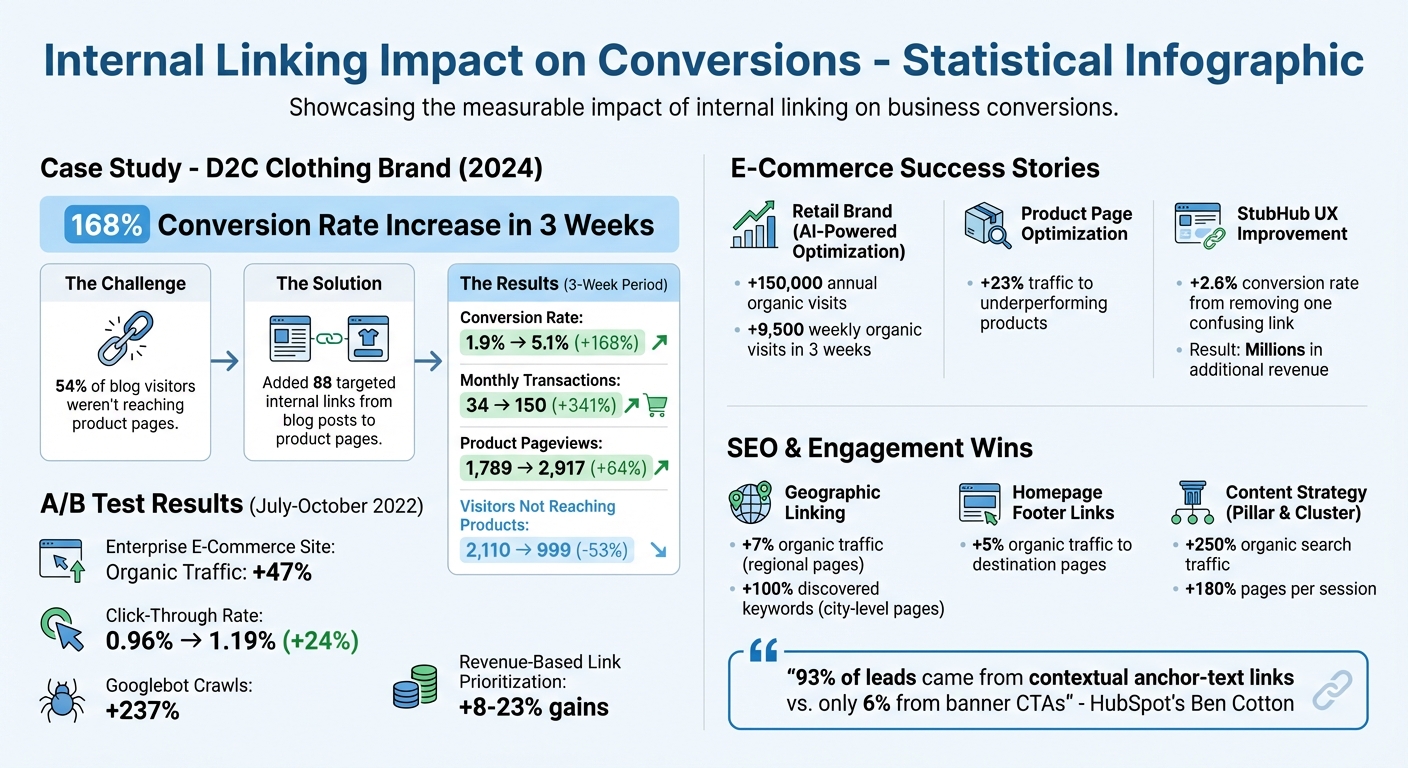
Internal Linking Impact on Conversions: Key Statistics and Results
The link between internal linking and revenue growth isn’t just theoretical – it’s backed by real-world examples of businesses achieving measurable success in conversion rates, transactions, and overall revenue.
Case Studies from Businesses
In 2024, a direct-to-consumer clothing brand tackled a major issue: 54% of blog visitors weren’t making it to product pages. Their solution? Adding 88 targeted internal links from blog posts to relevant product pages. The results were astounding. In just three weeks, their conversion rate skyrocketed from 1.9% to 5.1%, a 168% increase. Monthly transactions shot up from 34 to 150 – an incredible 341% growth. Even product pageviews surged by 64%, climbing from 1,789 to 2,917.
Another example comes from a large retail e-commerce brand that turned to AI-powered tools in 2024. By automating internal link optimization across thousands of pages, they reaped impressive results. Within three weeks, their site gained 9,500 additional weekly organic visits, which added up to 150,000 extra annual visits to optimized pages. Similarly, another retailer redirected internal links toward underperforming but top-selling products, boosting traffic to those pages by 23%.
Even small changes can lead to big wins. StubHub, for instance, discovered through user research that a single confusing internal link labeled “See Details” was creating unnecessary friction. By removing it and simplifying the user journey, they achieved a 2.6% increase in their conversion rate, which translated into millions in additional revenue.
These examples clearly demonstrate how internal linking can directly impact business outcomes.
Measuring the Impact of Internal Linking
The effectiveness of internal linking isn’t just anecdotal – it’s measurable through clear metrics. Here’s a snapshot of the performance improvements seen in one case study:
| Metric | Before | After (3 Weeks) | Change |
|---|---|---|---|
| Conversion Rate | 1.9% | 5.1% | +168% |
| Monthly Transactions | 34 | 150 | +341% |
| Product Pageviews | 1,789 | 2,917 | +64% |
| Visitors Not Reaching Products | 2,110 | 999 | -53% |
An enterprise e-commerce site took a data-driven approach by running a controlled A/B test from July to October 2022. They doubled internal links to high-revenue pages for one group while leaving a control group unchanged. The results? A 47% increase in organic traffic, a 24% boost in click-through rate (from 0.96% to 1.19%), and a 237% jump in Googlebot crawls. Interestingly, prioritizing links based on revenue per session outperformed other strategies, yielding gains of 8%–23%.
This trend spans industries. For example, an online marketplace linked nearby geographic locations on its platform, resulting in a 100% increase in discovered keywords for city-level pages. Meanwhile, a content platform using a “Pillar and Cluster” strategy saw organic search traffic grow by 250%, with pages per session increasing by 180% as of September 2025. These shifts highlight how internal links can enhance user engagement and drive conversions effectively.
SEO Benefits That Support Conversions
Improving Search Engine Rankings
Internal linking helps distribute PageRank across your site, signaling to Google which pages are more important. When high-authority pages link to product or service pages, it emphasizes their significance to search engines. The more internal links pointing to a page with relevant and descriptive anchor text, the stronger its topical authority becomes.
In May 2024, Sam Nemzer from SearchPilot conducted a controlled experiment on a website with about 8,000 regional pages. By adding internal links to nearby geographic regions, they observed a 7% increase in organic traffic. This experiment showed how internal linking helps search engines prioritize key content. In another test, expanding the homepage footer to include more internal links led to a 5% boost in organic traffic, proving that strategic link placement reinforces page importance in search algorithms.
“Internal linking is akin to building a roadmap for both users and search engines. By strategically linking pages, you can highlight the most important content, helping search engines understand which pages should be ranked higher.”
– Sam Nemzer, SearchPilot
Anchor text is a critical part of this process. About 81% of internal anchors are keyword-rich, while 15% use generic terms like “read more”. Those generic anchors are missed opportunities because descriptive anchor text provides clear context about the linked page. Google Search Central supports this, stating: “Anchor text… tells people and Google something about the page you’re linking to”. Strong anchor text not only improves rankings but also lays the groundwork for turning traffic into leads.
Aligning SEO and CRO Goals
Better search rankings bring in more targeted traffic, and when paired with well-placed internal links, they turn visibility into real conversion opportunities. Higher rankings mean more visitors, but guiding those visitors to key pages – like pricing, product details, or sign-up forms – makes all the difference.
HubSpot‘s Ben Cotton found that while banner CTAs accounted for just 6% of leads, up to 93% of leads came from contextual anchor-text links. This highlights how internal links connect SEO efforts with conversion goals.
“Internal links create the bridge between information intent and product action.”
– PAGUP Editorial Team
The key is matching search intent with the linked destination. For instance, a “how-to” guide should link to a relevant tool or service page instead of another informational article. This approach turns your site into a seamless journey rather than a collection of disconnected pages. As the PAGUP team puts it: “Good conversion paths usually do not feel like funnels. They feel like the next obvious step”.
Using tools like PageTest.AI can help refine and test your internal linking strategies, ensuring that your SEO efforts naturally lead to conversions.
Implementing Internal Linking Strategies for Conversions
Auditing Existing Internal Links
Start by crawling your site to map how authority flows between pages. This helps you spot broken links, redirect chains, and orphaned pages. Did you know that pages with fewer than three incoming links receive 60% fewer crawls? That’s a big gap in visibility.
Next, check your click depth. High-conversion pages should be within three clicks from your homepage. Pages buried deeper tend to see less traffic and lower crawl rates. To find existing pages mentioning relevant topics, try using Google’s search operator: site:yourdomain.com 'target keyword'. This can help you locate opportunities to link those pages to your key pillar content.
Also, take a close look at your anchor text. Around 28% of internal anchors lack semantic relevance to their target page’s title, and only 8% achieve a strong alignment with a similarity score above 0.7. Replace vague phrases like “click here” or “read more” with descriptive, value-driven text that clearly signals what the linked page offers.
Finally, use high-authority pages to drive traffic toward your most conversion-focused destinations.
Linking High-Traffic to High-Conversion Pages
High-traffic pages with solid backlinks are a goldmine for channeling authority to your conversion-focused pages. Identify these pages using backlink analytics, then strategically add contextual links directing users to your pricing, product, or sign-up pages. This makes the user journey smoother, encouraging visitors to take action instead of leaving your site.
When adding these links, place them in the main body content rather than sidebars or footers. Search engines give more weight to links surrounded by relevant content. Interestingly, pages that rank in the top three search results have, on average, 40% more internal links from related pages compared to those on the second page. That’s a clear signal that strategic linking can directly impact rankings and conversions.
Using Tools to Optimize Internal Links
Once your audit and linking strategies are in place, use specialized tools to fine-tune your approach.
Tools like PageTest.AI allow you to experiment with variations in anchor text, link placement, and calls-to-action (CTAs) without needing coding expertise. These tools track metrics like engagement and user behavior, helping you see what’s working and where you can improve.
For technical audits, dive into behavior flow reports in Google Analytics. These reports highlight where users are exiting your site – prime spots for adding internal links. And don’t just rely on tools. Manually browse your site to spot user experience (UX) issues that automated tools might miss. As Raquel González from MintyConnect points out:
“While auditing tools are valuable, they may overlook critical UX elements. Complement their analysis by personally navigating the entire website”.
Conclusion
Effective internal linking plays a crucial role in improving conversions. These links act as navigational tools, steering users through your site, enhancing SEO, and driving conversions by reducing friction, increasing session duration, and directing link equity to your most important pages. Studies consistently show that websites with a well-organized internal linking structure see noticeable gains in search rankings and conversion rates.
The evidence is clear: strategic internal linking works. Begin by auditing your current link structure. Pinpoint high-traffic pages and link them to conversion-focused destinations. Follow on-page SEO guidelines, like swapping out generic anchor text for descriptive, keyword-rich alternatives. As John Mueller from Google has emphasized:
“It’s one of the biggest things that you can do on a website to kind of guide Google and guide visitors to the pages that you think are important.”
Additionally, tools like PageTest.AI make it easy to experiment with anchor text, link placement, and CTAs without requiring coding skills, while also tracking engagement metrics.
Take time to review and refine your content, applying these strategies to elevate your site’s performance. With every click, you can turn improved navigation and SEO into measurable revenue growth.
FAQs
Which pages should I link to first to boost conversions?
To increase conversions, direct internal links to important pages such as product listings, service details, or pages with compelling calls-to-action (CTAs). Make sure these links align with the topic of the content users are already engaging with. Use clear and descriptive anchor text to guide users seamlessly while also helping search engines grasp the purpose of the linked page. This strategy improves navigation and encourages more conversions.
How do I write anchor text that improves clicks without hurting SEO?
To craft anchor text that grabs attention and supports SEO, focus on using specific, descriptive phrases that clearly reflect the content of the linked page. Steer clear of vague terms like “click here” – they don’t provide context for users or search engines. Instead, incorporate keywords that highlight the link’s purpose. This approach not only helps readers know what to expect but also signals relevance to search engines, driving engagement without sacrificing SEO benefits.
What metrics prove internal linking is increasing conversions?
Metrics showcasing the effect of internal linking on conversions reveal a 42.4% boost in daily impressions and a 6.4% uptick in daily clicks during A/B testing. These results underscore how well-planned internal linking can improve user interaction and deliver stronger outcomes.
Related Blog Posts
say hello to easy Content Testing
try PageTest.AI tool for free
Start making the most of your websites traffic and optimize your content and CTAs.
Related Posts
09-10-2026
 Becky Halls
VWO and AB Tasty Are Now Wingify: What the Merger Actually Means for Your Testing Stack
If you run A/B tests on VWO or AB Tasty, you’ve probably noticed the logins moved, the branding changed, and a new name, Wingify, started showing up in your inbox. Here’s what actually happened, what’s still unclear, and where a smaller, published-price tool like PageTest.AI fits if you’re reconsidering your stack because of it. The […]

31-08-2026
Becky Halls
Spiralyze alternatives: CRO agency or software in 2026?
Spiralyze makes an offer that’s hard to argue with. “30% lift in 90 days. No fee until we deliver.” More precisely: 10 tests, 3 wins, more than 30% lift in your first 90 days, and you pay nothing until they’ve done it. I’ll say plainly what most competitor pages wouldn’t. On risk alone, that’s a better offer than […]

31-08-2026
Becky Halls
AB Tasty alternatives: an honest comparison for 2026
AB Tasty is a strong platform with a well-liked support team, sitting at 4.4 on G2 across 418 reviews. Reviewers on TrustRadius describe it as better value than pricier AB Tasty alternatives, which in this category is a real compliment. It also has the most unusual buying process here. No published pricing, and no free […]