


How Structured Data Boosts Mobile Conversions

How Structured Data Boosts Mobile Conversions
 10-01-2026 (Last modified: 11-01-2026)
Structured data can significantly improve mobile conversions by transforming basic search results into rich, visually engaging displays. By embedding structured data like JSON-LD into your website, search engines can better understand and present your content in ways that grab attention on mobile screens. Key benefits include:
- Higher Click-Through Rates (CTR): Rich results featuring star ratings, prices, and product availability can boost CTR by up to 82%.
- Faster Decision-Making: Mobile users get key details like business hours, stock status, or shipping costs directly in search results, reducing friction.
- Improved Trust Signals: Elements like reviews and verified business info build credibility instantly, making your listing stand out.
- Enhanced Mobile-First Indexing: Ensures your search engine optimization for mobile aligns with Google’s indexing, critical for maintaining visibility.
For example, Nestlé saw an 82% CTR increase, and a financial client reported 400% organic traffic growth after implementing structured data. Adding schemas like Product, Local Business, or FAQ ensures mobile users find the information they need quickly, leading to higher conversions.
Structured data isn’t just about visibility – it filters traffic, attracting users ready to take action. Tools like Google’s Rich Results Test and platforms like PageTest.AI help implement, monitor, and refine structured data for better results. Start using structured data today to make your mobile search presence more effective and user-friendly.
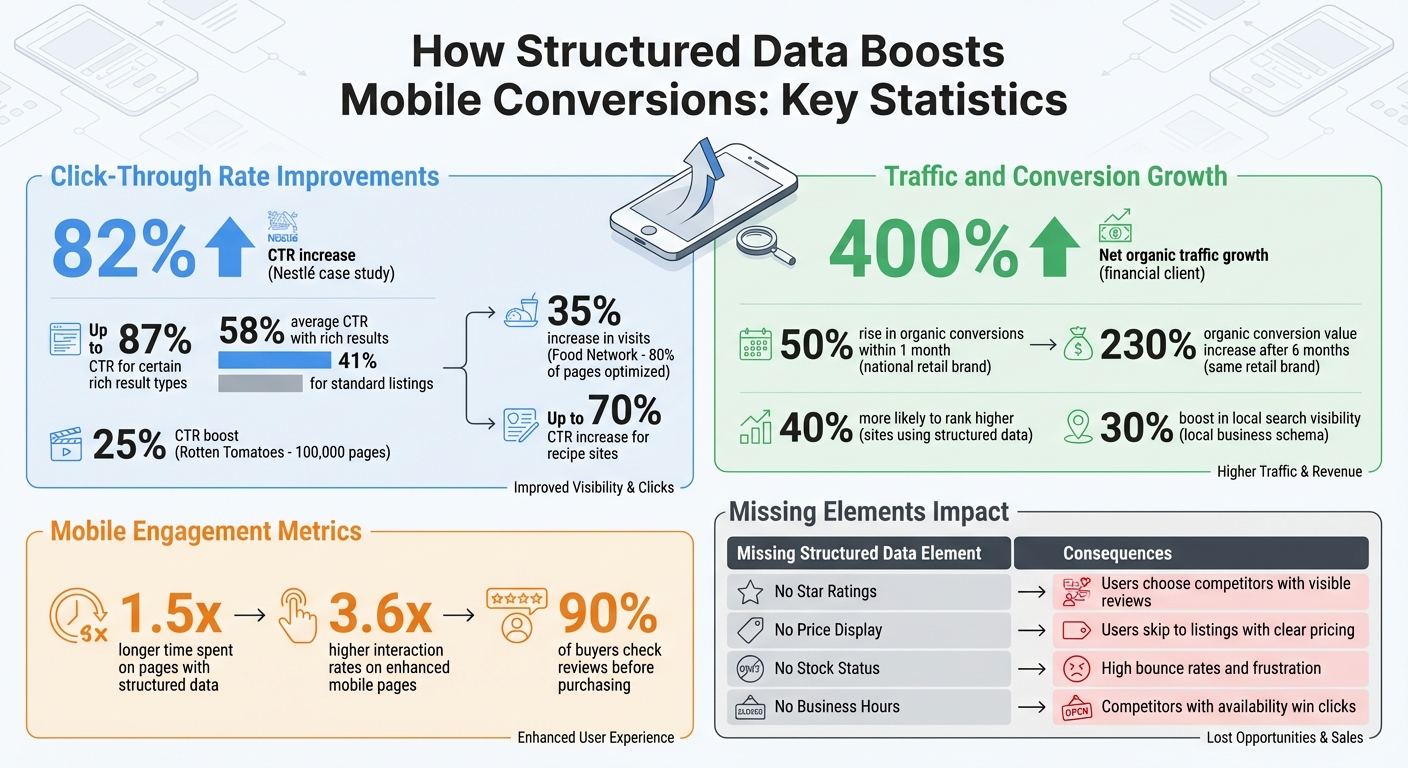
Structured Data Impact on Mobile Conversions: Key Statistics and Results
Mobile Conversion Problems That Structured Data Solves
Low Click-Through Rates on Mobile Devices
Mobile screens are compact, and plain text links often fail to grab attention. If your listing appears as simple text with a standard meta description, it’s easily overlooked – especially when competitors showcase star ratings, product images, or swipeable carousels. These visually enhanced results dominate the screen, drawing users in while basic listings fade into the background. Studies show that click-through rates can climb by up to 30%, and in some cases, even reach 51%. Without rich snippets, your visibility takes a significant hit. This lack of visual appeal also means users miss out on critical information right in the search results.
Missing Information in Mobile Search Results
Beyond just being seen, providing the right details is crucial for conversions. Mobile users are often in a hurry and need quick, clear answers. If your search result doesn’t display key information like price, stock availability, or business hours, users are likely to move on. They won’t waste time clicking through multiple sites just to figure out if your store is open or if the product they need is available. This creates unnecessary friction at the very moment users are ready to make a decision. For example, one major financial client experienced a 400% net growth in organic traffic from rich results after implementing structured data because they started presenting the exact details users were searching for upfront. When this information is missing, users abandon your result, leading to lost opportunities and lower conversions.
Mobile Users Need Instant Trust Signals
Mobile users make decisions fast. On-the-go searches require immediate credibility, and trust signals like star ratings, review counts, and verified business information help establish that trust. These elements differentiate legitimate businesses from less reliable ones. Sites using structured data are 40% more likely to rank higher, and adding local business schema can boost local search visibility by 30%. Without these trust markers, your listing lacks authority in the crowded mobile search space. On a small screen, where rich results dominate the viewport, the absence of these signals isn’t just a missed chance – it’s a direct hit to your conversions.
| Missing Element | What Happens | Result |
|---|---|---|
| Star Ratings | No immediate social proof visible | Users opt for competitors with visible reviews |
| Price Display | Users unsure about affordability | They skip to listings with clear pricing |
| Stock Status | Risk of clicking on unavailable items | High bounce rates and user frustration |
| Business Hours | No “Open Now” indicator for local searches | Competitors with clear availability win clicks |
sbb-itb-6e49fcd
How Structured Data Improves Mobile Search Performance
What Structured Data Does
Structured data is a standardized code embedded into your website’s HTML that helps search engines better interpret your content. Crystal Carter, Head of SEO Communications at Wix, simplifies it by saying:
“Schema markup is a means of essentially turning your beautiful website into a spreadsheet for robots.”
By providing clear, key-value pairs, structured data eliminates the guesswork for search engines. It essentially acts as a guide, informing Google precisely what each piece of information represents – whether it’s a product price, business hours, or customer ratings. This clarity is essential because, as Backlinko aptly points out:
“If a machine can’t understand your content, it can’t rank it – and it certainly won’t cite it.”
The most commonly used format is JSON-LD, which Google prefers because it keeps structured data separate from your visible HTML. This makes it easier to manage without interfering with your site’s design. With this setup, search engines can convert basic listings into visually appealing rich results.
Rich Results in Mobile Search
Once search engines process your structured data, they can upgrade your standard text listing into a rich result. These enhanced displays include images, star ratings, prices, and other engaging details. On mobile devices, where screen space is limited, rich results often dominate the entire screen.
The conversion rate optimization statistics speak for themselves. Rotten Tomatoes saw a 25% boost in click-through rates (CTR) after adding structured data to 100,000 pages. Similarly, the Food Network reported a 35% increase in visits after optimizing 80% of its pages for search enhancements. Mobile users also engage more deeply with pages using structured data, spending 1.5 times longer on them, while interaction rates on enhanced mobile pages are 3.6 times higher.
Filtering Traffic Before the Click
Structured data doesn’t just improve visibility – it also helps filter your traffic before users even click. By displaying essential details like price, availability, shipping costs, and ratings directly in search results, users can determine if your page matches their needs without visiting your site.
This filtering process works to your advantage. For instance, someone searching for a product under $50 won’t click on your result if it clearly shows $100. Similarly, users looking for same-day pickup won’t bother if your hours indicate you’re closed. The traffic you do receive is more likely to convert because these users already know your offering aligns with their needs. As Zach Paruch, SEO Strategist at Semrush, explains:
“Users immediately see key information that they can use to decide if your page meets their needs.”
Dell, for example, uses schema markup to display price ranges, availability, and delivery fees directly in search results. This upfront transparency weeds out casual browsers, attracting users who are ready to make a purchase. One national retail brand experienced a 50% rise in organic conversions within just one month of implementing schema markup. This success highlights how technical SEO integrates with broader conversion rate optimization methods to drive measurable growth. After six months, their organic conversion value skyrocketed by 230%. The key? The traffic they attracted was already primed to buy, thanks to the clear and actionable information presented right in the search results.
Structured Data: Schema for Ecommerce SEO
Schema Types That Increase Mobile Conversions
Each schema type is designed to align with specific mobile user behaviors. The trick is pairing the right schema markup with your business goals and what your audience needs. Let’s dive into how SEO and conversion optimization work together through schema to influence mobile results and make your search results work harder for you.
Product Schema for Online Stores
Product schema transforms basic search listings into powerful decision-making tools. By showing details like price, stock availability, and review ratings directly in the search results, users can compare products without the hassle of opening multiple tabs – a major win for mobile users navigating smaller screens.
For certain rich result types, click-through rates (CTR) can soar up to 87%, while the average hovers around 58%, compared to just 41% for standard listings. Why? Because mobile users get a quick snapshot of the information they care about – pricing, reviews, and availability – all before they even click.
If you’re running pages where users can buy directly, Merchant Listing markup takes it a step further. It displays details like shipping costs, return policies, and delivery timelines right in the search results. This upfront transparency helps weed out casual browsers and draws in serious buyers. Arthur Camberlein, SEO Senior Specialist at Shopify, highlights the importance of this approach:
“Implementing schema markup serves as positive directional information for E-E-A-T, further enhancing your site’s credibility in the eyes of both users and search engines.”
Local Business Schema for Service Providers
Local Business schema is a game-changer for service providers. It turns search results into actionable tools. For instance, when someone searches for “dentist near me” or “plumber open now”, businesses with this schema show up with key details like address, phone number, and operating hours directly in the Map Pack. This setup allows users to call, get directions, or even book appointments with a single tap – no need to visit your website first.
Using specific subtypes, like “Dentist” instead of the generic “LocalBusiness”, can further refine your visibility in the Map Pack, making it crystal clear what services you offer.
FAQ and HowTo Schemas for Question-Based Searches
Structured data doesn’t just make search results more useful – it makes them actionable. FAQ and HowTo schemas stand out on mobile screens in a way ordinary listings can’t. As Crystal Carter, a Technical SEO expert, puts it:
“Rich snippet SERP features… are impossible to miss as they often take up the entire viewport on mobile.”
FAQ schema is especially effective for increasing engagement. It allows you to display expandable Q&A content directly in the search results. What’s more, you can include links and HTML within the answers, guiding users to related pages on your site. Lily Ray, Vice President of SEO Strategy & Research at Amsive, emphasizes this strategic advantage:
“Look for opportunities within your FAQ answers to link to other relevant pages on your site, and you can use FAQ Schema to drive organic users to more than one page on your website.”
Meanwhile, HowTo schema offers step-by-step instructions that can include visuals and even be read aloud by Google Assistant, making it perfect for voice search. And since nearly 90% of buyers check reviews before making a purchase, providing detailed and actionable information in the SERP can bring users to your site with a strong intent to buy.
| Schema Type | Key Mobile Features | Primary Conversion Action |
|---|---|---|
| Product / Merchant | Price, stock status, review stars, shipping fees | Purchase / Add to cart |
| Local Business | Address, phone, hours, map integration | Call / Visit / Book appointment |
| FAQ | Expandable Q&A, internal links, prominent SERP space | Information gain / Lead generation |
| HowTo | Step-by-step images, voice search eligibility | Engagement / Voice search answers |
| Review | Star ratings, aggregate trust signals | Trust building / Purchase decisions |
How to Add and Test Structured Data for Mobile
Structured data plays a big role in how your content appears to mobile users, so getting it right – and testing it from a mobile perspective – is critical. With most traffic coming from mobile devices, ensuring your structured data is optimized for these users can make a big difference.
Adding Structured Data to Your Site
The easiest and most efficient way to add structured data is by using JSON‑LD. Google recommends it, and experts at Moz agree that its clean implementation is ideal. Unlike other methods, JSON‑LD doesn’t interfere with the visible content on your site. Instead, it’s placed separately within a <script type="application/ld+json"> tag, typically in the <head> section of your HTML.
Before you hit publish, use a JSON-aware text editor to catch common syntax errors like missing commas or mismatched brackets. If you’re running AMP pages to boost mobile speed, make sure the structured data on your AMP pages matches the data on your canonical pages. This is especially important since AMP pages need structured data to appear in Google’s Top Stories.
Checking Your Structured Data Markup
Once your structured data is live, use Google’s Rich Results Test to verify that everything is working as expected. This tool is set to the “Smartphone” user agent by default, which aligns with how most users browse the web today. As Google Search Console Help explains:
“The default user agent is smartphone, as this is how the majority of users browse the web today”.
You can use the tool to test code snippets before publishing or to check live URLs. Be mindful of blocked resources – if your mobile CSS or images are restricted by robots.txt, Google won’t be able to validate your mobile-friendliness or rich result eligibility. Also, avoid placing structured data on pages that require a login or are behind a firewall, as these restrictions prevent the testing tool from accessing the content.
For ongoing monitoring, turn to Google Search Console, which tracks structured data across your entire site. It flags errors like “Unparsable Structured Data” so you can address issues promptly. Once you’ve made fixes, click “Validate Fix” in Search Console to prompt Google to re-crawl your site. Keep in mind that full validation can take a couple of weeks, depending on how often Google crawls your pages.
After confirming that your structured data is valid, take it a step further by testing how it impacts mobile conversions with PageTest.AI.
Testing Structured Data Changes with PageTest.AI
Just because your structured data is error-free doesn’t mean it’s optimized for conversions. That’s where PageTest.AI comes in. This tool allows you to A/B test different structured data setups to find out which ones resonate most with mobile users.
For instance, you can experiment with variations like alternative product descriptions in your Product schema, different FAQ questions, or updated review displays. Then, track performance metrics such as clicks, engagement, and time on page to see what works best. The best part? PageTest.AI doesn’t require any coding knowledge. It integrates seamlessly with platforms like WordPress, Shopify, and Wix, making it accessible even for non-developers. Plus, its AI can generate alternative structured data options, helping you fine-tune your approach to better connect with mobile users.
Tracking Structured Data’s Effect on Mobile Conversions
To understand how structured data impacts your mobile conversions, focus on tracking key performance metrics and comparing results over time.
Metrics to Monitor
Start by monitoring your mobile click-through rate (CTR) in Google Search Console (GSC). Use the “Search Appearance” filters to narrow down performance data tied to specific schema types. Beyond CTR, keep an eye on metrics like bounce rate, time spent on site, scroll depth, tap-to-call actions, newsletter sign-ups, and purchases – these offer a fuller picture of user engagement.
Don’t forget about technical health metrics. GSC’s Enhancement reports let you track the number of pages marked as “Valid”, “Valid with Warning”, or “Error.” Pages with errors won’t qualify for rich results, so resolving those issues is critical. For even deeper analysis, you can use Google Tag Manager to send structured data schema types as custom dimensions or events into Google Analytics. This allows you to directly compare how pages with structured data perform against those without it.
Once you’ve gathered data, compare metrics from before and after implementing structured data.
Comparing Performance Before and After
Before rolling out structured data, establish a three-month baseline of your performance metrics. GSC provides up to 16 months of historical data, making it possible to compare your pre-implementation baseline to post-implementation results. To account for seasonal trends, use year-over-year comparisons for the same three-month period. When using GSC’s “Compare” feature, align your start and end dates with the same day of the week to avoid skewing results due to weekend traffic patterns.
To measure the impact of structured data, calculate the growth rate delta – this shows the difference in average month-over-month growth before and after implementation. Martha van Berkel, CEO of Schema App, offers a helpful tip:
“Comparing the clicks and impressions from these reports to those of the overall ‘Performance on Search Results’ allows you to see what percentage of clicks and impressions can be attributed to rich results”.
This method helps you isolate the contribution of rich results to your site’s overall growth during the same timeframe.
Ongoing Testing with PageTest.AI
To refine your structured data strategy, tools like PageTest.AI allow for continuous A/B testing of schema-powered content. For example, you can experiment with different headline formats in Product schema or test various FAQ questions to identify what you can A/B test to drive better mobile CTR. The platform tracks metrics like clicks, engagement, time on page, and scroll depth, helping you pinpoint the most effective variations.
Run these schema tests for two to four weeks to gather statistically reliable results. PageTest.AI’s no-code setup makes it easy to test and iterate quickly. Plus, its AI-generated content suggestions can introduce ideas you might not have considered. By combining structured data optimization with regular content testing, you can steadily improve your mobile conversion rates over time.
Conclusion
Structured data takes mobile search performance to another level by making content immediately actionable. On mobile devices, rich results dominate the screen, grabbing attention right away and presenting key details like prices, ratings, and availability directly in the search results. This not only helps filter traffic but also attracts users who are ready to take action – whether that’s making a purchase or engaging further with your site.
The impact is hard to ignore. Websites using structured data are 40% more likely to achieve higher rankings. For example, a national retail brand saw a 50% boost in organic conversions, while recipe sites experienced up to a 70% increase in click-through rates after implementing structured data. These results stem from offering mobile users instant trust signals, clear information, and a smooth browsing experience.
Structured data also plays a growing role in AI-driven search. During testing, 87.5% of sources cited by Perplexity were websites that already appeared in Google’s rich results for the same query. As AI-powered search tools gain traction, structured data becomes critical for staying visible on these emerging platforms.
But implementation isn’t a one-and-done task. Mobile search environments change quickly, and structured data markup can break when sites are updated or templates change. Regular testing is essential to ensure your pages remain eligible for rich results. Tools like PageTest.AI can help by continuously testing schema variations and identifying which ones drive better engagement on mobile. This aligns with earlier findings that rich snippets directly lead to higher conversion rates. By pairing structured data with ongoing optimization, you set the stage for sustained growth in mobile conversions.
Start by focusing on schema types that align with your business goals – Product for e-commerce, LocalBusiness for service-oriented sites, or FAQ for informational content. Use tools like Google Search Console to validate your setup, keep an eye on performance, and test different approaches to see what works best.
FAQs
How does structured data help improve mobile click-through rates?
Structured data, like schema markup, helps search engines create rich snippets for mobile search results. These snippets can showcase extra details such as star ratings, product prices, and FAQs, making your listing more eye-catching and informative.
This added visibility not only grabs attention but also encourages users to engage with your content. As a result, click-through rates often improve, driving more traffic to your site. Plus, it enhances the mobile browsing experience by making it quicker and simpler for users to find exactly what they’re looking for.
What schema types are most effective for boosting mobile conversions?
When it comes to boosting mobile conversions, certain schema types really stand out. For example:
- Organization schema: Perfect for highlighting your brand and key details about your business.
- Local Business schema: Helps users easily locate nearby stores or offices.
- Product schema: Showcases product details like pricing, availability, and features right in search results.
- Article schema: Enhances the visibility of blog posts or news articles.
- Review schema: Displays customer feedback, building trust and encouraging clicks.
By implementing these schemas, your content becomes more engaging and easier to find in search results. This not only improves user interaction but can also lead to higher mobile conversion rates.
How can I evaluate the impact of structured data on my mobile site’s performance?
To see how structured data impacts your mobile site, you can set up an A/B test and evaluate key metrics like click-through rates (CTR), conversions, and user engagement.
Start by gathering baseline data on your current mobile performance. Metrics like CTR, conversion rate, session duration, and page-load time can be tracked using tools such as Google Analytics. Then, create two versions of your page: one without structured data (the control) and another with schema markup (the variant), ensuring it aligns with Google’s guidelines. Use a tool like PageTest.AI to evenly split your traffic between the two versions. Let the test run for 2–4 weeks or until the results are statistically significant.
Once the test concludes, compare the performance metrics of both versions. If the page with structured data shows better visibility or higher conversions, roll out the schema markup across your site. If the results are inconclusive, tweak the schema and run another test to fine-tune your approach.
Related Blog Posts
say hello to easy Content Testing
try PageTest.AI tool for free
Start making the most of your websites traffic and optimize your content and CTAs.
Related Posts

09-10-2026
 Becky Halls
VWO and AB Tasty Are Now Wingify: What the Merger Actually Means for Your Testing Stack
If you run A/B tests on VWO or AB Tasty, you’ve probably noticed the logins moved, the branding changed, and a new name, Wingify, started showing up in your inbox. Here’s what actually happened, what’s still unclear, and where a smaller, published-price tool like PageTest.AI fits if you’re reconsidering your stack because of it. The […]

31-08-2026
Becky Halls
Spiralyze alternatives: CRO agency or software in 2026?
Spiralyze makes an offer that’s hard to argue with. “30% lift in 90 days. No fee until we deliver.” More precisely: 10 tests, 3 wins, more than 30% lift in your first 90 days, and you pay nothing until they’ve done it. I’ll say plainly what most competitor pages wouldn’t. On risk alone, that’s a better offer than […]

31-08-2026
Becky Halls
AB Tasty alternatives: an honest comparison for 2026
AB Tasty is a strong platform with a well-liked support team, sitting at 4.4 on G2 across 418 reviews. Reviewers on TrustRadius describe it as better value than pricier AB Tasty alternatives, which in this category is a real compliment. It also has the most unusual buying process here. No published pricing, and no free […]