


AI Tools for Multivariate Testing Plans
AI Tools for Multivariate Testing Plans
 19-02-2026 (Last modified: 26-02-2026)
AI makes multivariate testing simpler and faster. Instead of manually testing combinations of headlines, images, or buttons, AI automates content creation, data analysis, and traffic allocation. This means better results with less effort, even for teams without technical skills.
Key takeaways:
- Multivariate testing evaluates multiple webpage elements simultaneously to find the best-performing combinations.
- AI tools, like PageTest.AI, eliminate setup delays with no-code features, real-time analytics, and automated content generation.
- Benefits include time savings, precise insights, and accessibility for non-developers.
- Tools prioritize high-impact elements (e.g., CTAs, headlines) and adjust traffic toward better-performing variants during tests.
- PageTest.AI offers free and affordable plans, making it ideal for small businesses.
AI-driven testing helps you optimize webpages, increase conversions, and make decisions based on real user behavior – all without coding.
Benefits of AI in Multivariate Testing
Save Time and Money
AI has transformed the way businesses approach testing, cutting out the delays often caused by reliance on developers. With no-code tools and Chrome extensions, marketing teams can now set up experiments in minutes – no IT resources or complicated backend integration required.
Werner Geyser, Founder of Influencer Marketing Hub, shared: “As a marketer I have struggled so much with AB testing… I love that you have a chrome extension, it makes it so much easier!”.
The cost savings don’t stop at faster setups. AI-driven algorithms identify the best-performing variations, minimizing the number of combinations and the traffic needed for testing. By automating both variant creation and data analysis, businesses can focus their resources on impactful elements. This makes multivariate testing accessible even for smaller websites, while significantly lowering testing costs.
Better Accuracy and Insights
AI brings a level of precision to data analysis that manual methods can’t match. Machine learning algorithms sift through massive datasets to uncover patterns in user behavior, pinpointing which combinations of elements deliver the best results. Poor-performing variations are automatically eliminated, allowing promising options to shine. This process delivers insights faster and with greater reliability.
Beyond just identifying winners, AI tools provide a wealth of performance metrics – like heatmaps, session recordings, and revenue tracking – to show exactly how users engage with your site. Many platforms also include tools like statistical significance calculators and AI-generated recommendations to simplify the interpretation of results, so even those without a data science background can make informed decisions.
David Hall, CEO of AppInstitute, remarked: “Knowing we can test every call to action and optimize our SEO efforts is very satisfying”.
These precise analytics, combined with user-friendly interfaces, make it easier than ever to extract actionable insights.
No-Code Access for All Teams
AI-powered tools with visual editors and drag-and-drop functionality have made testing accessible to everyone, not just developers. This levels the playing field, enabling marketing and product teams to design and execute complex experiments independently. AI further simplifies the process by automatically generating variations for headlines, CTAs, and other key elements, ensuring maximum efficiency.
Platforms like PageTest.AI showcase this no-code approach. Its Chrome extension allows users to edit live webpages by simply highlighting text. The tool then creates AI-driven content variations and tracks their performance in real time – no technical expertise required.
Yaro Siryk, Cofounder of 3way.Social, shared: “As someone who has founded several online businesses, this tool is heaven sent! I’ve been looking for a cost efficient way to test my web page content for years”.
sbb-itb-6e49fcd
AI-Powered A/B Testing for $69 (PageTest.ai AppSumo LTD Review)
What to Look for in AI Multivariate Testing Tools
When choosing an AI testing platform, focus on one that delivers clear, actionable insights without overwhelming your team. The ideal tool combines automation and ease of use, enabling smarter testing without requiring advanced technical skills or heavy resource investment. Here are the key features to prioritize for effective AI-driven testing.
AI-Generated Content Variations
A good platform should automatically generate optimized content variations for your website. Modern AI tools can create up to 10 suggestions per element, including headlines, CTAs, button text, and product descriptions. These variations are informed by historical conversion data, ensuring you start testing with content that’s already likely to perform well.
Look for platforms that also offer AI-driven recommendations tailored to your specific content. Tools with visual editors and widget libraries make it easy to create and test variations without needing to write code. These features save time and directly link to performance metrics, helping you evaluate what resonates with your audience.
“We’ve seen teams generate dozens of AI-driven variations in minutes, only to overwhelm their own testing capacity. In practice, fewer, more intentional multivariate combinations almost always produced clearer results.” Ian Naylor, Founder of PageTest.ai
Real-Time Performance Analytics
Real-time analytics are crucial for making quick, informed decisions during tests. The platform should track key metrics like clicks, engagement rates, conversion rates, add-to-cart rates, checkout completions, and average order value (AOV). Built-in statistical significance calculators ensure your results are reliable before implementing changes.
“AI accelerates variation creation, but statistical significance still takes time. We’ve found that teams who respect sample size and test duration outperform those chasing quick wins.” Becky Halls, Strategist at PageTest.ai
Detailed element contribution reports are another must-have. These reports reveal which specific elements – like a headline or CTA – had the most impact on performance. Comprehensive dashboards that contextualize all experiments help your team understand not just what worked, but why it worked. For e-commerce businesses, this level of insight is essential when fine-tuning product descriptions, pricing strategies, and checkout processes.
Integration with Website Builders
Your AI testing tool should integrate seamlessly with your existing tech stack. Top platforms connect with over 30 tools, including Google Analytics, CRM systems, and major marketing platforms. For website builders, compatibility with platforms like WordPress, Shopify, Webflow, Wix, Magento, Squarespace, and Joomla ensures you can launch tests without technical headaches.
The most effective integrations use asynchronous scripts that load in the background, minimizing impact on site performance. For instance, PageTest.AI offers a Chrome extension that lets you select elements for testing directly on your live site – no backend access needed. This method adheres to the “golden rule” of testing: each visitor should only see one test at a time to maintain the integrity of results. Additionally, look for tools that support server-side testing for advanced privacy and performance needs, especially as GDPR and CCPA compliance become standard expectations.
How to Create and Run AI-Assisted Multivariate Tests
Running an AI-powered multivariate test is now easier than ever. You don’t need coding skills or technical expertise – modern platforms handle everything from selecting elements to analyzing results. This means marketing teams can fine-tune websites without relying on developers. Let’s break down how to design and execute these tests effectively.
Choose Elements to Test
Start by pinpointing the page elements that directly influence conversions. Key areas to focus on include headlines, CTAs (call-to-actions), button text, product descriptions, and hero images. These elements often have the most noticeable impact on performance.
For e-commerce websites, it’s smart to prioritize features like product descriptions, pricing displays, and checkout CTAs. These can significantly improve metrics like add-to-cart rates and average order value. On the other hand, content-driven sites should test headlines and page layouts to measure engagement factors like time on page and scroll depth.
AI tools make this process even simpler by analyzing user behavior and suggesting optimal combinations. Using evolutionary neural networks, AI can automatically weed out underperforming elements, saving time and reducing the traffic needed for meaningful results. If you’re using a tool like PageTest.AI’s Chrome extension, make sure you’re logged out of your CMS so you can view the page exactly as your visitors do.
Once you’ve identified the key elements, it’s time to use AI to quickly generate variations.
Use AI to Create Variants
After selecting the elements to test, let AI handle the heavy lifting by creating diverse content variations. For example, PageTest.AI can generate up to 10 suggestions for any element – whether it’s a headline, CTA, or product description. These AI-generated options are informed by historical conversion data, giving you a head start with content that’s already tailored for performance. You can also refresh the suggestions for new ideas or tweak them manually to align with your brand’s tone.
To get started, install the Chrome extension, click on the element you want to optimize, and let AI generate ready-to-use variants. Define the success metrics based on your specific goals:
- Use “Time on Page” for engagement-focused content.
- Choose “Click Element” to test CTA effectiveness.
- Opt for “Visit URL” to track lead generation funnels.
- Select “Page Scroll Depth” to evaluate content layout performance.
If you’re running multiple tests on the same page, use priority settings to control which test new visitors see first. This ensures each visitor only interacts with one test at a time, keeping your data clean and reliable.
Analyze Results and Make Changes
Once your variants are live, the focus shifts to analyzing the results and making data-driven adjustments. AI tools monitor visitor behavior in real time, tracking metrics beyond simple clicks. This includes time on page, scroll depth, and visits to secondary pages like registration or thank-you pages. Dashboards make it easy to interpret the data with clear visual indicators:
- Green means a variant is outperforming the control.
- Red signals underperformers.
- A gold trophy icon highlights the top winner.
AI can also flag major performance improvements. For instance, a specific CTA variant might deliver a 241% increase in clicks. Combination performance reports help you identify which element pairings drive the best engagement and conversions.
Before implementing changes, use built-in statistical significance calculators to ensure your results are reliable – aim for at least a 95% confidence level. Additionally, element contribution reports can pinpoint which components had the biggest impact, helping you prioritize future tests. For e-commerce sites, tracking revenue and conversion metrics alongside engagement data provides a clearer picture of how optimizations affect the bottom line.
“Knowing we can test every call to action and optimize our SEO efforts is very satisfying.”
– David Hall, CEO, AppInstitute
PageTest.AI: AI-Powered Multivariate Testing Made Simple
PageTest.AI Pricing Plans Comparison for Multivariate Testing
PageTest.AI simplifies multivariate testing by combining a no-code approach with AI-driven automation. It removes the technical hurdles that often block teams without developer support. With its point-and-click Chrome extension, you can launch tests in just minutes – no coding or IT assistance required.
Core Features of PageTest.AI
PageTest.AI has some standout tools to make multivariate testing easier. Using the Chrome extension, you can pick any element on your website – like headlines, CTAs, button text, or product descriptions. Once selected, the AI generates up to 10 optimized variations based on conversion data. Want more ideas? You can refresh suggestions or tweak them to better match your brand’s tone.
Performance tracking is handled by an AI engine that monitors key metrics like time on page, scroll depth, click events, and visits to important URLs. A centralized dashboard makes it easy to see results at a glance, with green indicators for high performers, red for underachievers, and a gold trophy marking the top winner.
PageTest.AI works seamlessly with all major website builders and CMS platforms, including WordPress, Shopify, Wix, Magento, and Google Tag Manager. Installation is straightforward – just add a lightweight, asynchronous JavaScript snippet that won’t slow down your site. For pages running multiple tests, you can prioritize which test visitors see, ensuring a smooth and organized testing experience.
How PageTest.AI Helps Small Businesses
For small businesses with limited technical resources, PageTest.AI’s automated and no-code setup is a game-changer. These businesses often can’t afford pricey optimization tools or dedicated development teams. PageTest.AI solves this with a “Free for Life” plan, offering 10,000 test impressions per month – plenty for smaller websites to run effective tests. The quick setup means marketing teams can dive into conversion rate optimization right away, no technical expertise required.
By automatically generating content variations, the platform saves time and reduces the need for extensive copywriting. In one live demo, PageTest.AI analyzed 187 content variations and 11,000 impressions, identifying a winning CTA that achieved 11 clicks compared to just 2 for the original – a 297% improvement.
“As someone who has founded several online businesses, this tool is heaven sent! I’ve been looking for a cost-efficient way to test my web page content for years.”
– Yaro Siryk, Cofounder, 3way.Social
This blend of affordability and ease of use makes PageTest.AI an excellent choice for small businesses looking to optimize without breaking the bank.
Getting Started with PageTest.AI
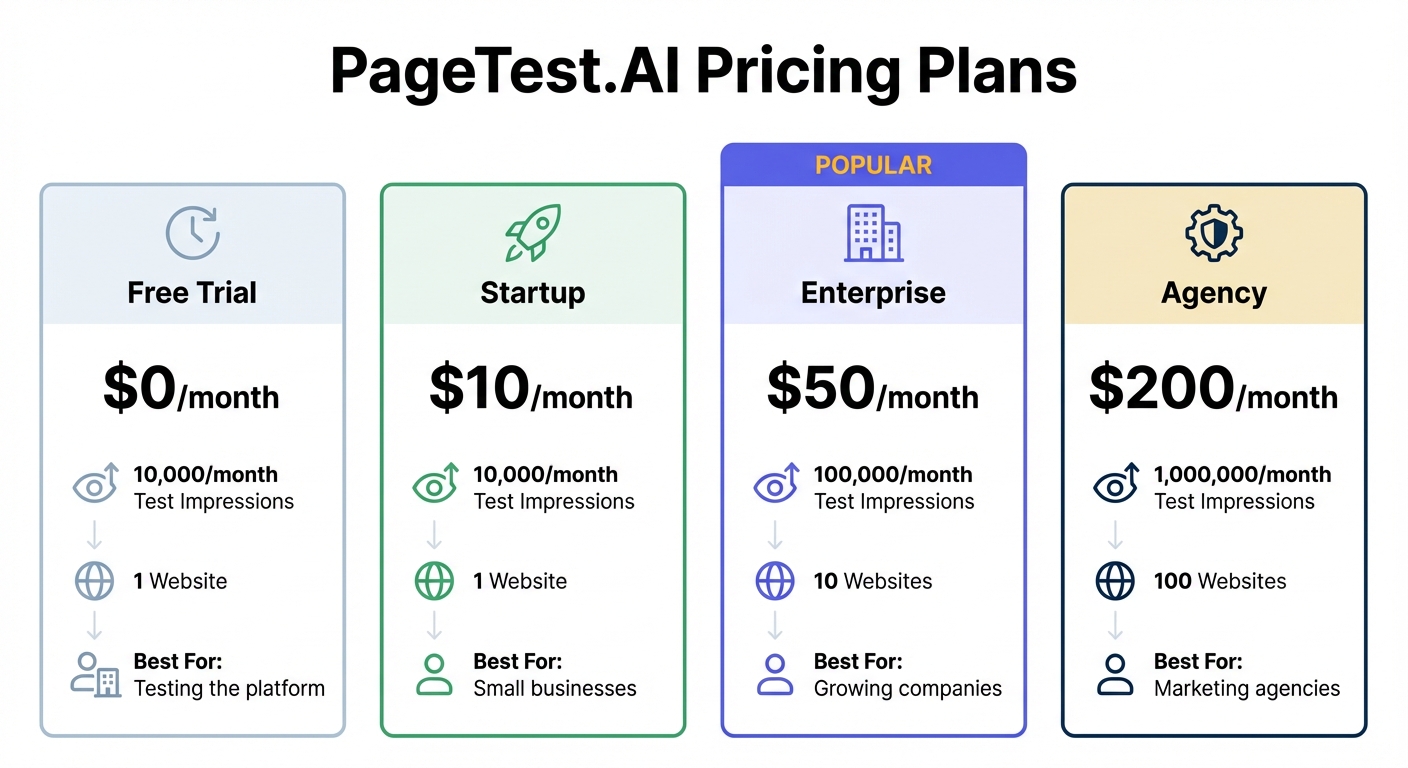
PageTest.AI offers four pricing plans to suit businesses of all sizes:
| Plan | Price | Test Impressions | Websites | Best For |
|---|---|---|---|---|
| Free Trial | $0/month | 10,000/month | 1 | Testing the platform |
| Startup | $10/month | 10,000/month | 1 | Small businesses |
| Enterprise | $50/month | 100,000/month | 10 | Growing companies |
| Agency | $200/month | 1,000,000/month | 100 | Marketing agencies |
The free trial provides full access to all AI features, making it easy to evaluate the platform. For smaller websites, the Startup plan offers enough impressions to identify high-performing variants. Agencies managing multiple client sites can take advantage of the Agency plan’s ability to handle up to 1,000,000 impressions across 100 websites.
Getting started is simple: sign up, add the JavaScript snippet to your site, and install the Chrome extension. Then, visit the page you want to optimize (while logged out of your CMS), click “Test this Page”, and choose the elements to improve. The AI will automatically generate variations and track their performance.
Conclusion
AI-powered multivariate testing has made website optimization more accessible and efficient, eliminating the need for heavy reliance on developers. By combining automated content creation, real-time analytics, and no-code tools, marketing teams can now test multiple elements – like headlines, CTAs, button text, and layouts – simultaneously. These tools streamline the process by quickly identifying underperforming variants and reallocating resources to elements that drive conversions, making data-driven decisions easier than ever.
PageTest.AI takes this process a step further. Its user-friendly Chrome extension, AI-generated variations, and detailed performance tracking make it possible to launch tests and pinpoint top-performing combinations in just minutes. With pricing starting at $0 per month for up to 10,000 impressions, even small businesses can afford to optimize their websites without stretching their budgets.
To get started, focus on testing high-impact elements like your main CTA or hero headline. Use AI-generated variations to find what resonates most with your audience. Monitor engagement metrics such as scroll depth and time spent on the page, and implement the best-performing options. With the right tools and a commitment to ongoing testing, boosting conversions no longer requires technical know-how – just a willingness to experiment and refine.
FAQs
How much traffic do I need for a multivariate test?
When planning a multivariate test, the amount of traffic you need hinges on a few key factors, such as the number of variations you’re testing and the confidence level you aim to achieve. As a rule of thumb, you should aim for at least 1,000 visitors per variation to ensure your results are reliable at a 95% confidence level.
How do I choose which page elements to test first?
When looking to boost conversions, start with the elements that are both impactful and easy to tweak. Think headlines, call-to-action (CTA) buttons, and product descriptions. These are prime areas where small changes can make a big difference.
Leverage tools like PageTest.AI to create variations of these elements and monitor how they perform. Focus on the ones that align closely with your objectives. For a deeper dive, consider multivariate testing to see how different components work together. By starting with content that’s quick to adjust, you can see results faster while refining your strategy.
How do I know when results are statistically significant?
When the p-value falls below your selected significance level (like 0.05), it indicates that the observed difference is unlikely to be due to random chance. However, for the results to be trustworthy, your experiment must also have an adequate sample size and run long enough to ensure dependable outcomes.
Related Blog Posts
say hello to easy Content Testing
try PageTest.AI tool for free
Start making the most of your websites traffic and optimize your content and CTAs.
Related Posts

09-10-2026
 Becky Halls
VWO and AB Tasty Are Now Wingify: What the Merger Actually Means for Your Testing Stack
If you run A/B tests on VWO or AB Tasty, you’ve probably noticed the logins moved, the branding changed, and a new name, Wingify, started showing up in your inbox. Here’s what actually happened, what’s still unclear, and where a smaller, published-price tool like PageTest.AI fits if you’re reconsidering your stack because of it. The […]

31-08-2026
Becky Halls
Spiralyze alternatives: CRO agency or software in 2026?
Spiralyze makes an offer that’s hard to argue with. “30% lift in 90 days. No fee until we deliver.” More precisely: 10 tests, 3 wins, more than 30% lift in your first 90 days, and you pay nothing until they’ve done it. I’ll say plainly what most competitor pages wouldn’t. On risk alone, that’s a better offer than […]

31-08-2026
Becky Halls
AB Tasty alternatives: an honest comparison for 2026
AB Tasty is a strong platform with a well-liked support team, sitting at 4.4 on G2 across 418 reviews. Reviewers on TrustRadius describe it as better value than pricier AB Tasty alternatives, which in this category is a real compliment. It also has the most unusual buying process here. No published pricing, and no free […]