


Category Page Layouts That Boost SEO
Category Page Layouts That Boost SEO
 26-01-2026 (Last modified: 09-02-2026)
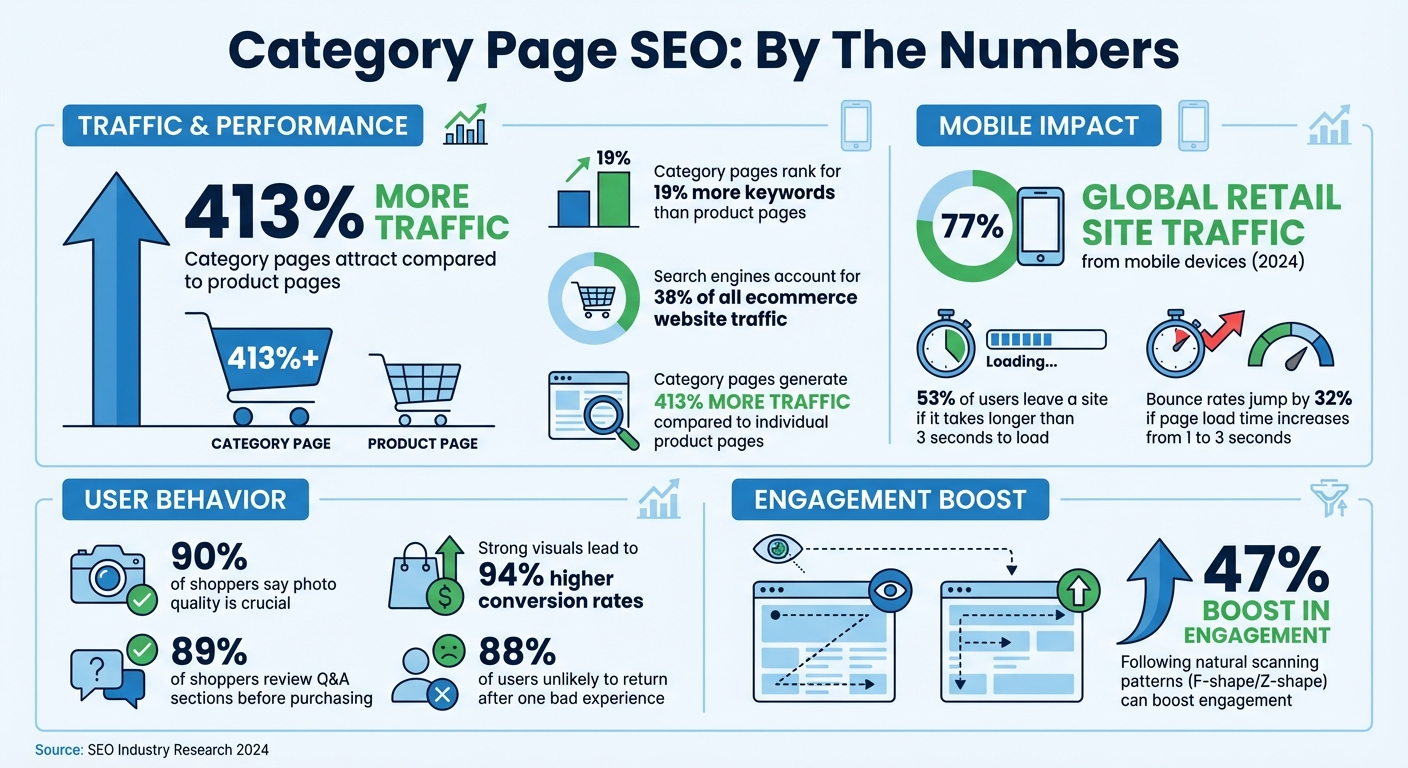
Category pages are essential for SEO success. They attract 413% more traffic and rank for 19% more keywords than product pages. Why? They target broad, high-traffic terms like "running shoes" and improve user navigation.
To optimize e-commerce category pages for SEO and conversions:
- Structure matters: Use clear hierarchies, breadcrumb navigation, and logical URLs (e.g.,
domain.com/womens/dresses/evening-dresses). - Content placement: Place concise descriptions above the fold, longer SEO content below, and use expandable sections on mobile.
- Mobile-first design: Ensure fast load times, clickable elements, and responsive layouts.
- Advanced features: Add schema markup (e.g.,
BreadcrumbList,FAQPage) for rich search snippets and optimize images with WebP format and lazy loading. - Pagination: Use unique URLs for paginated pages and manage crawl budgets with
noindex, followtags for deeper pages.
A well-designed category page boosts rankings, improves user experience, and increases conversions. Focus on clear navigation, mobile optimization, and SEO-friendly layouts to maximize results.
Category Page SEO Performance Statistics and Key Optimization Metrics
Want Your Ecommerce Category Pages To Rank On Google? Do This…
Implementing these layout changes is a key part of broader conversion optimization strategies designed to turn search traffic into sales.
sbb-itb-6e49fcd
Core Principles of SEO-Friendly Category Page Layouts
Creating category pages that rank well involves focusing on three key principles: a clear structure, smart content placement, and mobile optimization. Nail these, and you’ll have pages that are easy for both users and search engines to navigate.
Clear Hierarchies and Navigation Structure
Start by organizing your categories in a logical flow, moving from general to specific. For example, a structure like "Services > Digital Marketing > SEO Consulting" makes it easier for search engines to understand the relationships between pages while helping users find what they’re looking for quickly.
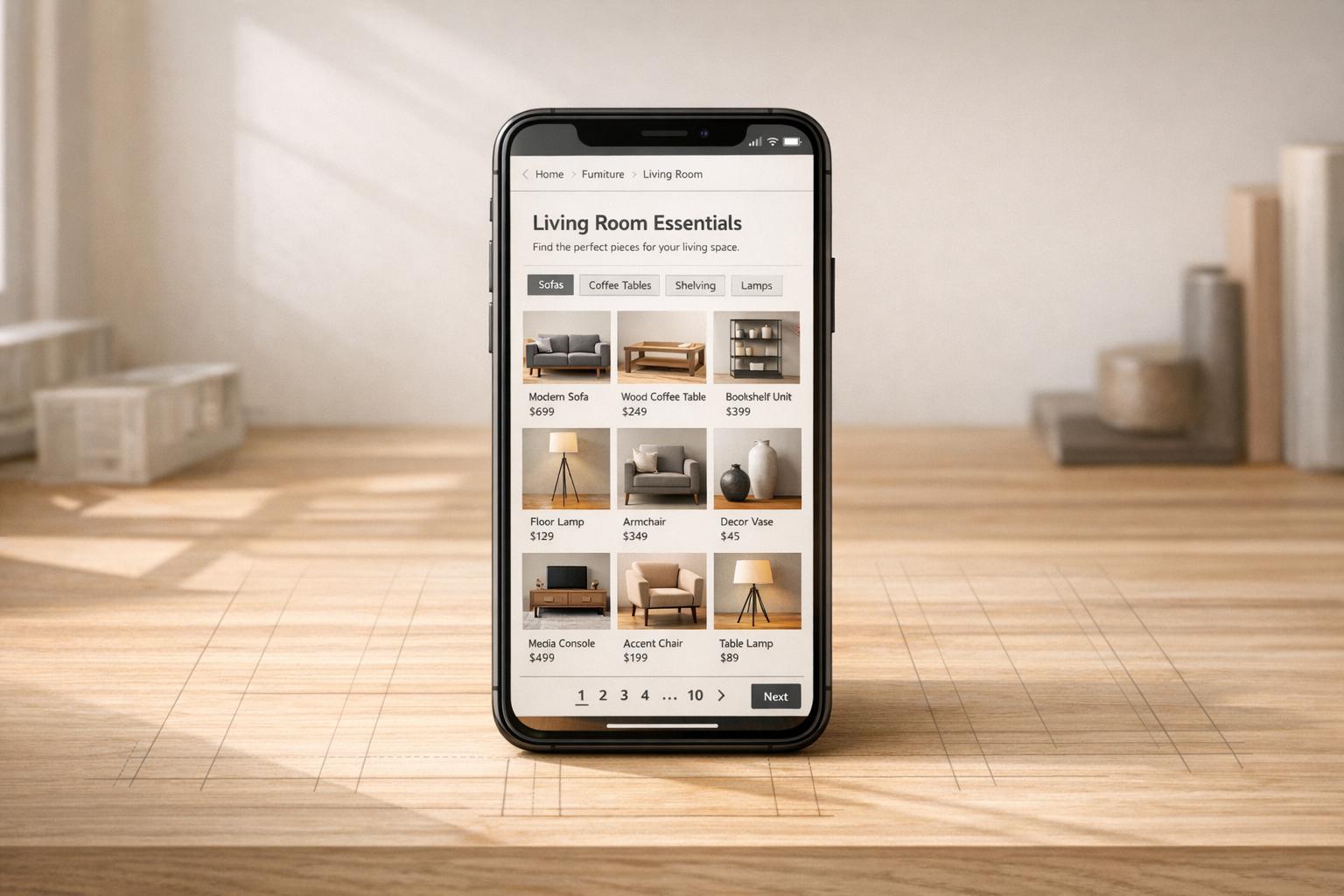
Incorporate breadcrumb navigation with schema markup to improve usability and search engine visibility. Breadcrumbs like "Home > Footwear > Running Shoes" not only guide users but also signal your site’s structure to Google. This can result in rich snippets in search results, which often lead to higher click-through rates. Keep URLs clean and reflective of this hierarchy; for instance, use domain.com/womens/dresses/evening-dresses rather than random characters or numbers.
For sites with extensive inventories, faceted navigation (filters for attributes like size, color, or brand) is a must. However, to avoid duplicate content issues, apply canonical tags or "noindex" directives to filtered pages.
"Start with your users in mind, and your search visibility will follow." – Rank Math
Once your navigation is streamlined, the next step is optimizing content placement to balance SEO needs and user experience.
Content Placement for SEO and User Experience
How you arrange content on category pages plays a big role in both rankings and conversions. Start with a clear H1 heading and a short introduction above the fold. This helps both search engines and visitors immediately understand the page’s purpose. However, avoid overloading this area with text, as it can push product listings too far down and hurt conversions.
Keep your introductory content concise – around 75–100 words – to highlight key brands or unique selling points. Place longer, SEO-focused content below the product grid, where it won’t disrupt the shopping experience. This layout aligns with natural scanning patterns: users tend to scan text-heavy pages in an F-shape and visual pages in a Z-shape. Following these patterns can boost engagement by up to 47%. To find the most effective layout for your specific audience, consider multivariate AB testing to compare different design elements simultaneously.
On mobile, make category descriptions expandable or collapsible to avoid cluttering the screen. Adding FAQ sections or customer reviews throughout the page can also enhance user experience, especially since 89% of shoppers review Q&A sections before making a purchase.
After perfecting content placement, it’s crucial to ensure your pages are optimized for mobile users.
Mobile-Friendly Design and Responsiveness
Mobile optimization is no longer optional – it’s essential. As of early 2024, mobile devices account for 77% of global retail site traffic, and 53% of users will leave a site if it takes longer than three seconds to load.
Design your category pages with mobile users in mind. Use clickable elements sized at least 48×48 pixels, collapsible menus to save space, and lazy loading for images to improve load times. Modern image formats can also help reduce file sizes without sacrificing quality.
Sticky headers are a smart addition for long product lists, ensuring that navigation and search bars remain accessible while users scroll. Maintain adequate white space between interactive elements to prevent accidental clicks. While mobile traffic dominates, conversions will lag if the mobile experience doesn’t match the quality of your desktop site.
Advanced Techniques for Category Page Layout Optimization
Once you’ve got the basics down, it’s time to dive into more advanced strategies to fine-tune your category pages. These techniques not only improve user experience but also help search engines better understand and rank your content. Let’s explore some key methods to take your category pages to the next level.
Structured Data for Better Search Visibility
Structured data can make your category pages stand out in search results. By using schema markup, you can enable rich snippets that display details like star ratings, product prices, and availability directly in search listings. These elements can significantly improve click-through rates.
Google recommends the JSON‑LD format for structured data because it’s easy to implement and doesn’t interfere with your site’s design. For category pages, focus on these four schema types:
BreadcrumbList: Helps users and search engines understand the navigation path to the current page.ItemList: Identifies the list of products displayed on the page.Product: Highlights specific products with details like price, currency, and ratings.FAQPage: Provides answers to common questions, often earning additional space in search results.
| Type | Purpose for Category Pages | Key Properties to Include |
|---|---|---|
BreadcrumbList |
Defines the navigation path | itemListElement, position, item, name |
Product |
Highlights specific products | name, offers (price/currency), aggregateRating |
FAQPage |
Marks up FAQs to gain more SERP visibility | mainEntity, acceptedAnswer |
ItemList |
Identifies product lists | itemListElement, url |
Adding schema markup also helps your site perform better in AI-driven features like Google AI Overviews and allows tools like ChatGPT to interpret your content more accurately. By providing "semantic context", you help search engines connect your content to user intent, improving how your pages are classified and ranked.
Image Optimization and Visual Elements
High-quality images can make or break a shopper’s decision. In fact, 90% of shoppers say photo quality is crucial , according to recent conversion rate optimization statistics, and strong visuals can increase site conversion by as much as 94%. But unoptimized images can slow down your site, frustrating users and hurting rankings.
To keep your pages fast and visually appealing:
- Convert images to WebP format to reduce file size without losing quality.
- Use lazy loading so images only load as users scroll, speeding up initial page loads.
- Leverage a Content Delivery Network (CDN) to serve images from servers closer to your users, reducing latency.
Don’t forget to write descriptive alt text for every image. This not only helps visually impaired users but also gives search engines more context about your content. Consistency is key – standardize image sizes and styles across your layout to maintain a cohesive look. You can even add hover effects on product grids to show secondary images, like lifestyle shots, without requiring users to click through.
While images are vital for driving conversions, they need to work hand-in-hand with concise, keyword-rich copy to ensure search engines can still understand your page’s relevance.
Pagination and Managing Large Category Pages
Handling large inventories requires careful pagination to avoid SEO pitfalls and ensure all products are indexed. Each page in a paginated series should have a unique, crawlable URL using either query parameters (e.g., ?page=2) or directory paths (e.g., /page/2/). Make sure to include self-referencing canonical tags – for example, page 2 should point to itself as canonical, not back to page 1. Avoid using fragment identifiers (e.g., #page2), as search engines typically ignore content after the hashtag.
"If you link sequentially, what will generally happen is the first page of your site will have a lot stronger signals… and then it kind of like incrementally drops and drops and drops as it goes through the pagination set." – John Mueller, Search Advocate, Google
For sites with massive inventories, use noindex, follow tags on deep paginated pages (e.g., beyond page 5) to conserve your crawl budget while still allowing search bots to discover product links. Include links to specific page numbers (e.g., 1, 2, 3 … 10) rather than relying solely on "Next" and "Previous" buttons to distribute ranking signals more evenly across all product pages.
Finally, manage faceted navigation carefully. Use AJAX for filters to avoid creating countless thin-content URLs that dilute your crawl budget. Block low-value filtered views – such as sorting by price or color – in your robots.txt file to keep search engines focused on your most important pages.
These advanced techniques ensure your category pages remain fast, user-friendly, and optimized for search engines, even as your inventory grows.
Maintaining Consistency with Layout Templates
Once you’ve fine-tuned individual elements, keeping your design consistent across category pages strengthens both user experience and SEO performance.
Consistent Design for Better Crawlability
A uniform layout makes it easier for search engines to crawl your site and understand its hierarchy. But it’s not just about search engines – consistency also benefits users. When shoppers can reliably locate product filters, search bars, and calls-to-action on every category page, they navigate faster and stick around longer. Neil Patel, Co-Founder of NP Digital, emphasizes this point:
When every category page is structured the same, it’s easy for shoppers to quickly navigate your site. They know what to expect, where to look for items, and how to filter product options.
This predictable design can lower bounce rates, a factor Google considers when assessing page quality. Keeping elements like headers, footers, color schemes, and fonts consistent across pages creates a cohesive brand experience that encourages visitors to stay engaged.
Not only does this consistency improve crawlability, but it also lays a solid foundation for scalable template designs.
Template Design for Easy Scaling
Standardized templates take consistency a step further by making it easier to expand and maintain SEO-friendly category pages. Platforms like WordPress and Shopify let you save templates, so you can quickly launch new pages without sacrificing quality.
Templates also ensure critical SEO elements – like canonical tags, breadcrumbs, and metadata – are applied consistently. They can even automate internal linking, helping to avoid orphan pages. For instance, you might use a global meta description template such as: "Shop [category name] from [Brand Name]. [Value proposition]. [CTA]."
This automated linking works hand-in-hand with your site’s established navigation structure, distributing PageRank from high-authority pages to deeper subcategories and product pages. As John Mueller, Search Advocate at Google, explains:
We do use the internal links to better understand the structure of a page.
Conclusion: Using Better Layouts to Improve SEO
Strong category layouts can significantly boost your search rankings. In fact, category pages tend to generate 413% more traffic compared to individual product pages. These pages are essential for targeting broad, high-volume search terms that product pages often can’t address effectively.
The success of these pages relies on the balance between design and functionality. As we’ve discussed, clear hierarchies, strategic content placement, and mobile-friendly designs are the cornerstones of effective SEO. Features like breadcrumbs, optimized above-the-fold content, and structured data not only distribute PageRank efficiently but also help search engines understand your site’s structure and catalog.
The impact of layout decisions goes beyond just rankings – they influence user behavior too. Search engines account for 38% of all traffic to ecommerce websites, and every detail, from H1 headings to faceted navigation, shapes how users and crawlers interact with your site. Poor layout choices can be costly: 88% of users are unlikely to return after a single bad experience, and bounce rates jump by 32% if a page takes three seconds to load instead of one. A well-thought-out layout keeps bounce rates low, increases time spent on the page, and ensures smooth navigation.
Once these core principles are in place, scaling becomes much easier. With solid templates, you can roll out new category pages quickly while maintaining critical SEO elements like canonical tags, internal linking, and metadata. This consistency benefits both crawlers and users, making your site more reliable and user-friendly. Tools like PageTest.AI can further streamline the process by helping you test and refine layout elements, ensuring your pages perform at their best.
Focus on the basics – hierarchical URLs, concise above-the-fold content, and mobile optimization – and you’ll see improvements in both your search visibility and conversion rates. A well-optimized category layout is your key to climbing the search rankings.
FAQs
Why are category pages important for improving SEO compared to product pages?
Category pages are essential for SEO because they help structure your website in a way that search engines can easily understand. Acting as pillar pages, these pages can rank on their own, increasing your site’s visibility and attracting more traffic.
Another advantage of category pages is their use of internal links. They often connect to related products or subcategories, which not only improves navigation for visitors but also helps distribute link equity across your site. This combination makes category pages a valuable asset for enhancing your site’s overall performance and search rankings.
Why is mobile optimization important for category page SEO?
Mobile optimization plays a key role in category page SEO because it impacts both user experience and search engine rankings. With the majority of users now browsing and shopping on their phones, having a mobile-friendly category page ensures faster load times, easy navigation, and a clean, readable layout. This helps keep visitors engaged and reduces bounce rates.
Search engines like Google give priority to websites that are mobile-friendly. So, making sure your category pages are responsive and work seamlessly across all devices can improve your search rankings. A better mobile experience doesn’t just help with SEO – it can also lead to higher conversions and happier customers.
How does structured data improve the visibility of category pages in search results?
Structured data plays a key role in helping search engines grasp the content and purpose of your category pages. By including detailed information about your products, categories, and brands, you make it easier for search engines to interpret your pages with greater accuracy and confidence.
When done right, structured data can also lead to enhanced search results through rich snippets – those extra details like star ratings, prices, and product availability that make your listing pop. These visual enhancements not only draw attention but can also increase click-through rates, bringing more organic traffic your way. It’s a straightforward yet highly effective way to make your category pages shine and attract the right audience to your site.
Related Blog Posts
say hello to easy Content Testing
try PageTest.AI tool for free
Start making the most of your websites traffic and optimize your content and CTAs.
Related Posts

31-08-2026
 Becky Halls
Spiralyze alternatives: CRO agency or software in 2026?
Spiralyze makes an offer that’s hard to argue with. “30% lift in 90 days. No fee until we deliver.” More precisely: 10 tests, 3 wins, more than 30% lift in your first 90 days, and you pay nothing until they’ve done it. I’ll say plainly what most competitor pages wouldn’t. On risk alone, that’s a better offer than […]

31-08-2026
Becky Halls
AB Tasty alternatives: an honest comparison for 2026
AB Tasty is a strong platform with a well-liked support team, sitting at 4.4 on G2 across 418 reviews. Reviewers on TrustRadius describe it as better value than pricier AB Tasty alternatives, which in this category is a real compliment. It also has the most unusual buying process here. No published pricing, and no free […]

31-08-2026
Becky Halls
The best Optimizely alternative: a comparison for 2026
Optimizely is the most capable experimentation platform on the market. I don’t think that’s seriously disputed. Server-side testing, feature flags, personalization, statistical depth, and it all runs at genuine enterprise scale. In 2026 they’ve wrapped the whole thing in “agentic experimentation” branding and shipped an AI variation development agent, and the underlying Web Experimentation product […]