


How AI Improves CTA Testing and Refinement
How AI Improves CTA Testing and Refinement
 08-01-2026 (Last modified: 09-01-2026)
AI tools are transforming how businesses test and refine call-to-action (CTA) buttons, making the process faster, smarter, and more efficient. Traditional A/B testing methods often take weeks and require significant manual effort, but AI solves these challenges by automating variation creation, real-time traffic adjustments, and performance tracking. Here’s what you need to know:
- AI simplifies testing: Automatically generates CTA variations based on proven strategies and user data.
- Real-time optimization: AI dynamically shifts traffic to the best-performing CTAs without delays.
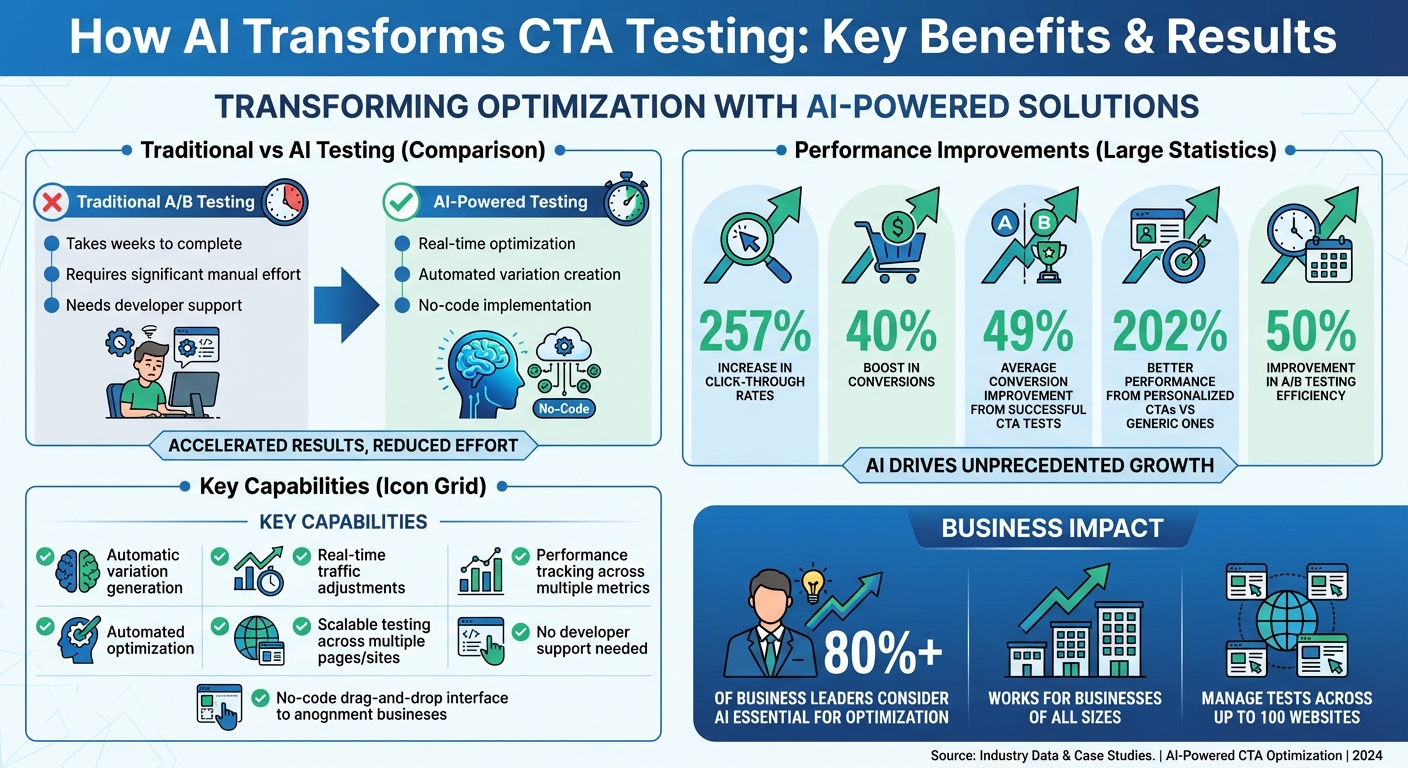
- Improved results: AI-driven CTAs can boost click-through rates by up to 257% and conversions by 40%.
- No-code tools: Platforms like PageTest.AI let marketers update CTAs without developer support.
- Scalable testing: Manage and optimize CTAs across multiple pages or websites effortlessly.
AI eliminates guesswork, speeds up decision-making, and ensures your CTAs align with user behavior, driving better engagement and increasing site conversions. Whether you’re a small business or a large agency, tools like PageTest.AI make it easy to implement these strategies and see results quickly.
AI-Powered CTA Testing: Key Benefits and Performance Statistics
Setting Up AI-Powered CTA Testing with PageTest.AI
Installing and Configuring PageTest.AI
Getting started with PageTest.AI is straightforward. For WordPress users, head to “Plugins > Add New”, search for “PageTest.AI”, then install, activate, and link it using your unique API key. If you’re using platforms like Shopify, Wix, or Magento, simply insert the provided JavaScript snippet into your website’s header or deploy it through Google Tag Manager.
For added convenience, PageTest.AI offers a Chrome extension that allows you to pick CTAs directly on your live site – no need for backend access. This tool makes the testing process incredibly easy and has earned a perfect 5.0/5 rating on the Chrome Web Store.
Defining Test Parameters
Once installed, you can begin by selecting the pages or posts you want to test. Narrow down your audience by filtering user segments using URL parameters, such as utm_source=google.
Next, set up success metrics with the AI Success Engine. You can track key actions like clicks, scroll depth, time spent on the page, or even conversions leading to thank-you or checkout pages. These metrics give you a detailed understanding of how your CTAs perform at every stage of the customer journey. With everything configured, your tests are ready to launch, offering real-time insights and optimization.
sbb-itb-6e49fcd
Creating CTA Variations with AI
Using AI for CTA Copywriting
PageTest.AI makes crafting effective call-to-action (CTA) variations easier by using real conversion data to suggest optimized options. With its Chrome extension, you can highlight any button text or headline and instantly receive multiple alternatives tailored to your needs.
The platform goes a step further by creating messaging specific to audience segments. For instance, it might suggest “Check availability” for shoppers focused on price or “See the full process” for visitors who value detailed information.
AI-generated CTAs also tap into psychological triggers to encourage action. For example, phrases like “Don’t miss the demo” play on loss aversion to create urgency, while options such as “See how companies like yours solved this” build trust through social proof. The tool even suggests supporting subtext – known as “kickers” – to address potential objections. Examples include “No obligation” or “Fast response time” to ease hesitation.
“I recommend writing your CTA to complete the sentence ‘I want to…’ This keeps the message in the reader’s own words, not yours, and helps ensure alignment between intent and action.” – Joe Martin, Conversion Director, Orbit Media
Using action-oriented verbs and first-person phrasing can make a big difference. Research shows that CTAs like “Start my free trial” perform better than “Start your free trial” by creating a more personal connection. PageTest.AI naturally integrates these insights into its suggestions.
Once you have these AI-generated CTAs, the next step is to make them uniquely yours.
Customizing Variations to Match Your Brand Voice
After generating CTA suggestions, it’s essential to refine them so they align with your brand’s personality. While PageTest.AI provides a solid foundation, tweaking these options ensures they resonate with your audience and reflect your brand identity. Feeding the AI examples of your most effective content – like successful email campaigns, high-performing landing pages, or popular blog posts – can help it better understand your style.
Create a brand dictionary filled with your go-to phrases, terminology, and even emojis that make your brand instantly recognizable. You can also define technical guidelines, such as preferred sentence length or vocabulary complexity, to ensure consistency across all messaging.
“Your brand voice is the unique personality your brand expresses through words. It’s the how behind your messaging – the difference between sounding like a trusted guide or a corporate press release.” – Esther Van den Eynde, StoryChief
For specific campaigns, you can manually adjust AI suggestions to fit the tone or urgency you need. Whether you’re emphasizing a limited-time offer or adopting a softer tone for educational content, these adjustments ensure your message stays on-brand while connecting with your audience.
Launching and Monitoring CTA Tests
Setting Up A/B and Multivariate Tests
When it comes to testing, a smooth launch and consistent monitoring are key for ongoing improvement. Start by using the Chrome extension to set up your test. Simply point and click on the target button or headline you want to test.
Next, decide between A/B testing vs multivariate testing – where you compare two versions of a single element versus examining multiple variables at once, which examines multiple variables at once, such as pairing different headlines with varied CTA button text.
“As a marketer I have struggled so much with AB testing… I love that you have a chrome extension, it makes it so much easier!” – Werner Geyser, Founder, Influencer Marketing Hub
For websites with lower traffic, stick to A/B tests on high-priority elements like your main CTA. Save multivariate testing for sites with higher traffic, as those tests need more data to reach statistical significance. To ensure your SEO remains intact, the platform’s testing scripts rely on canonical URLs.
Once your test is live, the focus shifts to real-time performance tracking.
Tracking Key Metrics
While your tests are running, PageTest.AI’s dashboard provides instant insights – no manual coding or developer assistance required. You can easily track metrics like click-through rate (CTR), time spent on the page, and scroll depth to understand user engagement.
Dive into the full visitor journey. The platform tracks not just CTR, but also how long users stay on the page, how far they scroll, and what pages they visit next. These metrics help evaluate whether your CTAs are driving meaningful engagement. For instance, over 90% of visitors who read a headline also read the accompanying CTA, and personalized CTAs tend to perform 202% better than generic ones. It’s also important to assess lead quality and revenue impact to ensure your winning variations attract not just more clicks, but also better-qualified leads.
“Knowing we can test every call to action and optimize our SEO efforts is very satisfying.” – David Hall, CEO, AppInstitute
Allow your tests to run for at least one to two weeks to account for traffic variations and gather enough data. On average, successful CTA tests can boost conversions by 49%, but you’ll need a full business cycle to get reliable results. If you notice visitors aren’t scrolling far enough to see your CTA, the issue may be its placement rather than the copy itself. Use this insight to tweak your layout before the test wraps up.
Analyzing Results and Improving CTAs
Identifying Winning Variations
Once you’ve gathered enough data, the next step is pinpointing which CTA variation truly delivers. AI simplifies this process by analyzing a range of metrics simultaneously, rather than just focusing on clicks. It tracks factors like click events, time spent on the page, scroll depth, and actions taken across multiple pages, giving you a complete picture of how visitors interact with your site.
This broader view helps distinguish between meaningful engagement and accidental clicks. For instance, if one variation gets a lot of clicks but visitors leave the site right after, the AI flags it as a potential red flag. On the other hand, if users click through and continue exploring your site, that indicates genuine interest. By evaluating all metrics, the system identifies the variation that performs best overall.
In multivariate testing, AI takes it a step further by uncovering how individual elements work together. For example, you might find that a specific headline paired with a certain button color leads to higher conversions, while the same headline with a different button text performs poorly. These insights not only show what works but also why it works, giving you a deeper understanding to refine your approach.
Using Auto-Optimization Features
With PageTest.AI’s automatic winner selection, you can skip the hassle of manually updating your CTAs. Once the platform identifies the top-performing variation, it can automatically implement it – no need to log in and make adjustments yourself. This ensures your tests adapt instantly, even when changes to the code occur.
The AI also takes care of traffic distribution, monitors performance in real time, and adjusts seamlessly – even if your UI elements are updated. This eliminates the risk of tests breaking unexpectedly and saves you from constant maintenance headaches.
Scaling CTA Optimization Across Multiple Pages
Managing Tests Across Pages and Sites
After crafting a winning CTA for one page, the next logical step is to replicate that success across your entire site – or even multiple sites. With AI, this process becomes much simpler. Instead of launching website AB testing one page at a time, you can optimize several pages simultaneously, saving you weeks of manual effort while maintaining consistency across your web presence.
Take PageTest.AI, for example. Their Chrome extension allows you to highlight and tweak CTAs directly on live pages without touching a single line of code. The tool works seamlessly across platforms like WordPress, Shopify, Wix, and Magento, requiring just one testing snippet added to your site header. This setup makes it easy to manage and optimize CTAs across all your sites from a single, centralized location.
For larger-scale operations, PageTest.AI offers centralized dashboards that enable teams to oversee experiments across up to 100 websites. Their pricing tiers cater to different needs: the Enterprise plan ($50/month) supports 100,000 impressions on 100 pages across 10 sites, while the Agency plan ($200/month) accommodates 1 million impressions with unlimited pages across 100 sites. The Agency plan also includes multi-seat access, making it ideal for collaborative teams. With these tools, managing multi-site tests becomes more streamlined, and detailed tracking ensures you can clearly measure the impact of each campaign.
Tracking Performance Across Campaigns
While scaling tests is important, understanding how your CTAs perform across various pages and campaigns is equally critical. AI tracking goes beyond basic metrics like click counts by analyzing scroll depth, time spent on a page, and user navigation paths. For instance, you can see if a visitor who clicks a CTA on your homepage continues to your pricing page or completes a checkout. This gives you a detailed picture of the user journey.
The platform consolidates data from all tested pages, making it easier to identify trends. For example, you might notice that CTAs with benefit-driven language consistently perform better than generic ones across product pages, blog posts, and landing pages. In fact, research shows that personalized CTAs convert 42% better than generic ones. These insights can help you refine your approach and tailor CTAs to resonate with your audience in different contexts.
“Knowing we can test every call to action and optimize our SEO efforts is very satisfying.” – David Hall, CEO, AppInstitute
AI also monitors for unusual activity, such as sudden drops or spikes in performance, and sends automatic alerts to your team. This feature is particularly useful when managing campaigns across multiple domains, as it helps you address small issues before they escalate into larger problems.
Conclusion
Key Takeaways
AI has transformed the way marketers approach CTA testing, removing the time-consuming manual tasks that once slowed progress. Instead of hours spent crafting copy variations or waiting for developer support, AI-powered tools allow you to generate optimized alternatives in just minutes. In fact, AI can improve A/B testing efficiency by as much as 50%, and over 80% of business leaders consider it essential.
The real game-changer? Automation and scalability. AI doesn’t just churn out variations; it analyzes complex user behaviors – like scroll depth, time spent on a page, and multi-page navigation – to pinpoint what truly drives conversions. This means your optimizations are rooted in actual user intent, not just surface-level metrics. For agencies or businesses managing numerous sites, AI makes it possible to test hundreds of pages simultaneously, something traditional methods simply can’t achieve.
The results speak for themselves. A successful CTA test can boost conversions by an average of 49%. Personalized CTAs, in particular, deliver an impressive 202% improvement over generic ones. Tools like PageTest.AI make these capabilities accessible to businesses of all sizes, whether you’re a startup testing a handful of pages or an agency juggling dozens of websites. These insights offer actionable steps to start improving your results immediately.
Next Steps for Implementing AI in Your Strategy
Getting started with AI-powered CTA testing is straightforward and requires little investment or technical know-how. For example, PageTest.AI provides a free trial, which includes 10,000 impressions, 5 pages, and 5 tests on a single website. This trial is enough to see meaningful results without spending a dime. Setup is simple: add a snippet to your site header, install the Chrome extension, and select CTAs to test directly on your live pages.
To maximize impact, begin with your highest-traffic pages – these will help you reach statistical significance faster. Focus on tracking macro conversions, such as purchases or form submissions, rather than just clicks. While AI handles variation creation and data analysis, it’s important to validate results with human oversight to ensure they align with your brand’s voice. Integrating the platform with tools like Google Analytics can also provide a clearer picture of how CTA changes influence the entire customer journey.
Uncovering the ‘Why’ Behind CTA Performance with Soulmates
FAQs
How does AI simplify creating CTA variations?
AI makes crafting multiple call-to-action (CTA) variations a breeze. By analyzing your existing copy, it can churn out several alternative options in just seconds. Thanks to advanced language models, the tedious task of brainstorming is replaced with quick, automated suggestions.
Beyond saving time, this process ensures the variations are tailored for better performance. Marketers can use these AI-generated options to test and fine-tune CTAs, making their campaigns more effective.
What metrics should you focus on when testing CTAs with AI tools?
When using AI tools to test and improve your CTAs, keeping an eye on key performance metrics is crucial for understanding user behavior and measuring campaign success. Pay close attention to metrics like click-through rate (CTR), conversion rate, and clicks-to-submissions to see how well your CTAs are encouraging users to take action.
It’s also a good idea to track engagement signals such as time spent on the page, scroll depth, and user interactions. These details offer a clearer picture of how visitors are interacting with your content and where adjustments might be needed. With these insights, AI-powered tools can guide you in fine-tuning your CTAs to drive stronger results.
How can I make sure AI-generated CTAs match my brand voice?
To make AI-generated call-to-actions (CTAs) truly reflect your brand, begin by defining your brand’s tone, style, and key vocabulary. These elements act as a guide for the AI, ensuring the output aligns with your overall messaging. Adjust the AI-generated suggestions as needed to maintain a consistent voice.
If you’re using tools like PageTest.AI, you can input your brand’s parameters to create customized CTA options. Carefully review the suggestions, keeping only those that fit your brand’s personality and language. Once finalized, test the selected CTAs through A/B or multivariate testing. Use the performance data to refine your approach further. This method ensures your CTAs not only stay true to your brand but also boost engagement effectively.
Related Blog Posts
say hello to easy Content Testing
try PageTest.AI tool for free
Start making the most of your websites traffic and optimize your content and CTAs.
Related Posts

31-08-2026
 Becky Halls
Spiralyze alternatives: CRO agency or software in 2026?
Spiralyze makes an offer that’s hard to argue with. “30% lift in 90 days. No fee until we deliver.” More precisely: 10 tests, 3 wins, more than 30% lift in your first 90 days, and you pay nothing until they’ve done it. I’ll say plainly what most competitor pages wouldn’t. On risk alone, that’s a better offer than […]

31-08-2026
Becky Halls
AB Tasty alternatives: an honest comparison for 2026
AB Tasty is a strong platform with a well-liked support team, sitting at 4.4 on G2 across 418 reviews. Reviewers on TrustRadius describe it as better value than pricier AB Tasty alternatives, which in this category is a real compliment. It also has the most unusual buying process here. No published pricing, and no free […]

31-08-2026
Becky Halls
The best Optimizely alternative: a comparison for 2026
Optimizely is the most capable experimentation platform on the market. I don’t think that’s seriously disputed. Server-side testing, feature flags, personalization, statistical depth, and it all runs at genuine enterprise scale. In 2026 they’ve wrapped the whole thing in “agentic experimentation” branding and shipped an AI variation development agent, and the underlying Web Experimentation product […]