


Core Web Vitals Benchmarks by Industry
Core Web Vitals Benchmarks by Industry
 28-03-2026 (Last modified: 07-08-2026)
Core Web Vitals (CWV) are key metrics that directly impact website performance, user experience, and search rankings. They include:
- LCP (Largest Contentful Paint): Measures loading speed.
- INP (Interaction to Next Paint): Tracks interactivity and response time.
- CLS (Cumulative Layout Shift): Evaluates visual stability during page load.
Key Findings:
- Global Performance:
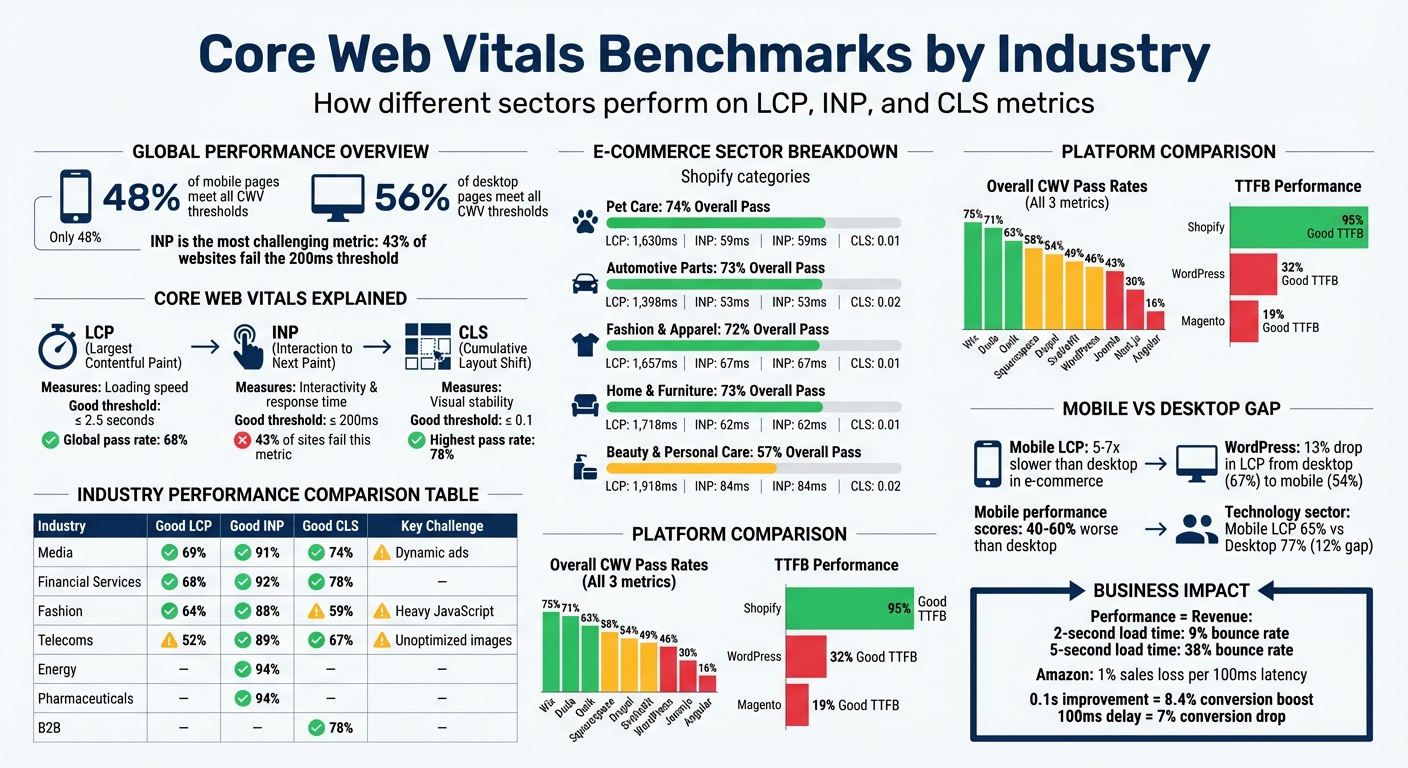
- Only 48% of mobile pages and 56% of desktop pages meet all CWV thresholds.
- INP is the most challenging metric, with 43% of websites failing to meet the 200ms “good” threshold.
- Industry Insights:
- E-commerce: Struggles with LCP due to heavy images and scripts. Mobile performance lags behind desktop significantly.
- Technology: Script-heavy frameworks cause delays, but CLS scores are generally strong.
- News & Media: Ads and dynamic elements hurt performance, especially on mobile.
- Content Management Systems (CMS): Platforms like Shopify outperform WordPress in TTFB and CWV pass rates.
- Impact on Business:
- Pages loading in 2 seconds have a 9% bounce rate, compared to 38% for 5-second loads.
- Amazon reported a 1% sales loss for every 100ms of latency.
Quick Tips to Improve CWV:
- Optimize images using WebP or AVIF formats.
- Minimize JavaScript and third-party scripts.
- Use edge caching for faster server response times.
- Reserve space for dynamic elements to reduce layout shifts.
These metrics are more than technical details – they directly influence rankings, bounce rates, and conversions.
Core Web Vitals Performance Benchmarks Across Industries and Platforms
Core Web Vitals Explained: How To Fix Site Optimization Issues
sbb-itb-6e49fcd
1. E-commerce
E-commerce websites face distinct performance hurdles that stem from their reliance on product images, third-party scripts, and intricate page designs. These factors often lead to slower load times and less responsive user experiences. According to data, 76% of Shopify-based e-commerce sites meet the Core Web Vitals assessment standards for both mobile and desktop, though performance can vary significantly by sub-industry.
LCP Pass Rates
Largest Contentful Paint (LCP) is a key challenge for e-commerce platforms, with 77% of sites relying on images as their primary LCP element. Pass rates differ across sectors, ranging from 79% for Beauty & Personal Care stores to 91% for Automotive Parts retailers. One major factor is the number of third-party services: Beauty stores typically load 31 such services (like chat widgets and analytics), whereas Automotive stores only load 15. This creates a strong negative correlation (r = -0.658) between the number of third-party services and performance scores.
While just 1% of stores achieve the 2.5-second LCP benchmark in throttled 4G lab simulations, 85% succeed in real-world conditions, where faster internet speeds and cached assets improve performance. Even a small improvement, such as a 0.1-second reduction in mobile load time, can lead to an 8.4% boost in conversion rates, directly affecting revenue.
INP Pass Rates
Interaction to Next Paint (INP) pass rates are generally strong across e-commerce, with most industries staying below the 200-millisecond threshold for “good” performance. However, tools like Google Tag Manager, used by 90% of stores, add an average delay of 495 milliseconds. Product Detail Pages are particularly heavy, containing about 10% more JavaScript than homepages due to features like review widgets and “add to cart” functionality. These elements make optimizing interactivity on these pages especially challenging.
CLS Pass Rates
Cumulative Layout Shift (CLS) is the most stable metric in e-commerce, with 85% of Shopify stores meeting the CLS standard according to field data. Modern themes often handle layout stability well, but issues like missing image dimensions still account for 35% of layout shifts. Other disruptions come from dynamically injected content such as promotional banners and chat widgets. The median CLS for e-commerce sites is 0.01, comfortably within the “good” threshold of under 0.1.
Mobile vs Desktop Performance
Mobile performance consistently lags behind desktop across all e-commerce sectors. Mobile LCP times are typically 5 to 7 times longer than desktop LCP times, with mobile homepage LCP ranging from 10 to 13 seconds, compared to 1.7 to 2.1 seconds on desktop. Shopify stores have a median Lighthouse performance score of 47 on mobile, compared to 65 on desktop. Overall, mobile e-commerce scores are 40% to 60% worse than desktop scores due to limitations in hardware and network conditions. These differences highlight the unique performance dynamics of e-commerce when compared to other industries.
| Industry Segment | Overall CWV Pass Rate | Median LCP (Field) | Median INP (Field) | Median CLS (Field) |
|---|---|---|---|---|
| Pet Care | 74% | 1,630ms | 59ms | 0.01 |
| Automotive Parts | 73% | 1,398ms | 53ms | 0.02 |
| Fashion & Apparel | 72% | 1,657ms | 67ms | 0.01 |
| Home & Furniture | 73% | 1,718ms | 62ms | 0.01 |
| Beauty & Personal Care | 57% | 1,918ms | 84ms | 0.02 |
Source: EcomHint Shopify Speed Benchmark 2026
2. Technology
Technology websites face a unique set of challenges compared to e-commerce sites. While e-commerce relies heavily on image-heavy pages, technology sites often depend on script-heavy frameworks and complex interactivity. As of February 2026, 53% of technology sites earned a “Good” rating across all three Core Web Vitals on mobile devices. However, this average hides significant differences based on the technology stack. For example, Wix-built sites boast a 75% pass rate, while Angular-based sites struggle with only 16%. These stats highlight how critical the choice of technology stack is for delivering a solid user experience.
LCP Pass Rates
The sector has made strides in improving Largest Contentful Paint (LCP) performance. Currently, 65% of technology sites achieve a “Good” LCP score on mobile, and 77% on desktop – a major improvement from just 39% in March 2020. However, challenges persist. An analysis of 208,000 pages revealed an average LCP of 2,836 milliseconds, with critical request chains affecting 98.9% of pages with poor LCP scores. Additionally, 57.4% of these pages face high initial server response times. Many sites hover near the critical 2.5-second threshold, with median Lighthouse Performance scores of 47 on mobile and 66 on desktop, reflecting ongoing optimization hurdles.
INP Pass Rates
Interaction to Next Paint (INP) remains a sticking point for many technology websites. While 82% of mobile origins in this sector meet the 200-millisecond threshold, heavy reliance on JavaScript frameworks continues to delay user interactions. Inefficient cache policies impact 87.4% of pages, and long main-thread tasks affect 78.4%. For example, WordPress-based sites show a 98% INP pass rate on desktop but drop to 88% on mobile, revealing a notable 10% performance gap. Despite these challenges, visual stability shows better results, as outlined below.
CLS Pass Rates
Cumulative Layout Shift (CLS) is where technology websites shine. 83% of sites achieve a “Good” CLS score on mobile. Interestingly, WordPress sites perform better on mobile (84%) than on desktop (71%), which is unusual compared to other industries. The mean CLS across technology sites is 0.14.
Mobile vs Desktop Performance
Performance differences between mobile and desktop devices further emphasize the challenges in this sector. Mobile LCP rates lag behind desktop by 12 percentage points (65% vs. 77%), and mobile pages average 2 MB in weight compared to 3 MB on desktop. Among the Top 1,000 high-traffic technology sites, desktop pages achieve a 70.4% “Good” LCP rating, while mobile pages fall to 60.1%.
Philip Walton from web.dev notes, “The performance of a site can substantially vary based on a user’s device capabilities, their network conditions, what other processes may be running on the device, and how they’re interacting with the page”.
Given that Google uses mobile-first indexing, these mobile performance scores directly affect search rankings, even if desktop performance is better.
| Technology/Framework | Good CWV (All 3) |
|---|---|
| Wix | 75% |
| Qwik | 63% |
| SvelteKit | 49% |
| WordPress | 46% |
| Next.js | 30% |
| Angular | 16% |
Source: Web Technology Core Web Vitals Analysis, February 2026
3. News and Media
News and media websites face a unique challenge when it comes to Core Web Vitals. These sites juggle the need for fast-loading pages with the demands of ad tech, social media embeds, and live updates. Unfortunately, this combination often results in performance issues, creating significant hurdles for publishers. For news outlets, mobile performance is particularly critical since most readers access content through platforms like social media or Google Discover.
LCP Pass Rates
Optimizing Largest Contentful Paint (LCP) is a top priority for news sites to meet user expectations. Across the web, the pass rate for LCP is 68% as of early 2026. However, many news websites fall short due to factors like large hero images, slow servers, and render-blocking CSS. Currently, 32% of all web origins exceed the “Good” threshold of 2.5 seconds for LCP. Desktop pages perform better, with 85.51% meeting the standard, compared to only 63.1% on mobile.
After tackling LCP issues, news publishers must focus on improving interactivity to align with Interaction to Next Paint (INP) benchmarks.
INP Pass Rates
Interaction to Next Paint (INP) has become a major stumbling block for many industries, with 43% of sites failing to meet the 200-millisecond threshold. For news sites, mobile INP performance is particularly affected by ad tech, consent pop-ups, and comment scripts. A 2022 study of the top 10,000 most popular websites revealed that only 23% of mobile pages met the “Good” INP threshold, a stark contrast to higher success rates on desktop. The March 2024 shift from First Input Delay (FID) to INP further impacted publishers, as many rely on third-party interactive widgets.
CLS Pass Rates
In addition to speed and interactivity, maintaining stable layouts is essential. Cumulative Layout Shift (CLS) has the highest pass rate among Core Web Vitals at 78%, yet dynamic elements like ads continue to cause problems for news sites. Ads that load without reserved space often push content down, leading to poor CLS scores. Studies show that 94.5% of pages with poor CLS are affected by large layout shifts, 86.3% by render-blocking resources, and 82.6% by hidden text during font loading. The average CLS score across the web is 0.14, which exceeds the “Good” threshold of 0.1.
“Fix the template first. One broken page shell can spoil an entire section.” – CurratedBrief
Mobile vs Desktop Performance
The gap between mobile and desktop performance is a significant concern for news publishers. With Google’s mobile-first indexing, mobile performance directly impacts search rankings, even if desktop performance is stronger. Research shows that 53% of mobile users abandon a page if it takes more than 3 seconds to load. Since the majority of news readers access content on mobile devices, poor mobile performance directly affects engagement and visibility. A single underperforming mobile template can negatively impact numerous pages in Search Console. Following Google’s February 2026 core update, publishers are under even more pressure to deliver a seamless user experience to maintain visibility on platforms like Google Discover.
| Metric | Good Threshold | Common News-Site Failure |
|---|---|---|
| LCP | ≤ 2.5s | Heavy hero images, slow servers, render-blocking CSS |
| INP | ≤ 200ms | Ad tech, consent tools, comment scripts, long JS tasks |
| CLS | ≤ 0.1 | Late-loading ads, embeds, web fonts, sticky bars |
4. Content Management Systems
The performance of a Content Management System (CMS) hinges on its architecture and hosting environment. Closed-source platforms like Wix, Shopify, and Squarespace generally deliver better performance due to built-in features such as edge caching, optimized themes, and fewer dependencies on third-party plugins. On the other hand, WordPress, which powers 43.2% of all websites, shows widely varying performance based on hosting quality and configuration. Like other digital sectors, CMS performance directly impacts user experience and conversion rates, making these metrics crucial for optimization.
LCP Pass Rates
When it comes to Largest Contentful Paint (LCP), CMS platforms show notable differences. WordPress sites hosted on managed services achieve an average performance score of 76, while those on shared hosting drop significantly to 58. Across the web, the average LCP is 2,836 milliseconds. For WordPress specifically, desktop LCP pass rates are at 67%, whereas mobile performance lags behind at 54%.
“WordPress’s 32% TTFB isn’t a platform issue – it’s a hosting quality issue.” – Mohan Raj, Founder, Hostingstep
INP Pass Rates
The shift to Interaction to Next Paint (INP) in March 2025 has had a mixed impact on CMS platforms, particularly those relying heavily on JavaScript. Between January and April 2025, Wix experienced a 7.11% decline in INP pass rates, while WordPress saw only a 0.71% drop. By late 2025, Duda led overall Core Web Vitals pass rates at 71%, followed by Squarespace (58%), Drupal (54%), Wix (52%), Joomla (43%), and WordPress (38%). Despite this, WordPress demonstrates strong desktop INP performance at 98%, though its mobile performance is slightly lower at 88%.
CLS Pass Rates
Cumulative Layout Shift (CLS) is an area where many CMS platforms excel. As of February 2026, Wix led with a desktop CLS pass rate of 95%, followed by Squarespace (93%), Shopify (89%), Drupal (89%), WordPress (87%), and Joomla (84%). Interestingly, WordPress shows a reverse trend, with a 71% CLS pass rate on desktops compared to 84% on mobile. The average CLS score across the web sits at 0.14, surpassing the “Good” threshold of 0.1. Improved visual stability from better CLS scores directly enhances user engagement and boosts site conversion.
For example, Yahoo! JAPAN resolved a significant CLS issue, leading to a 15.1% increase in page views per session and a 13.3% increase in session duration. Similarly, Redbus reduced its CLS from 1.65 to 0 by fixing component slots and removing problematic tag insertion scripts, which resulted in an 80–100% boost in mobile conversion rates globally.
Mobile vs Desktop Performance
The gap between mobile and desktop performance remains a challenge across all CMS platforms. Mobile users often encounter slower load times due to the limited processing power of mobile devices and higher network latency on mobile connections like 4G. These factors amplify issues such as high Time to First Byte (TTFB) and large image payloads. For instance, in 2025, the average WordPress page size reached 579.92 KB, reflecting a 50 KB increase in image payloads.
| CMS Platform | Performance Score (0–100) | Avg Load Time | LCP (Avg) |
|---|---|---|---|
| Webflow | 88 | 1.8s | 1.6s |
| WordPress (Managed) | 76 | 2.1s | 1.9s |
| Shopify (Dawn Theme) | 72 | 2.4s | 2.2s |
| WordPress (Shared) | 58 | 3.8s | 3.4s |
| Squarespace | 54 | 4.1s | 3.7s |
| Wix | 42 | 5.2s | 4.8s |
“Mobile performance is still where individual stores most often lose discipline, even on a strong platform baseline.” – HTTP Archive Web Almanac 2025
5. Retail and Secondary Pages
Retail websites face a tough challenge: even if the homepage is optimized, the rest of the site often lags behind. Secondary pages like product details, collections, and shopping carts can struggle with performance due to factors like heavy image galleries, complex product options, customer reviews, and third-party app integrations.
A study of 1,000 Shopify stores revealed that only 48% met all three Core Web Vitals thresholds on mobile. Performance benchmarks vary widely across retail sectors – Outdoors and Sports gear retailers lead with a 63% pass rate, while Beauty brands trail at 36%. Stores that meet these thresholds typically see lower abandonment rates, and even small improvements matter: shaving 0.1 seconds off load time can boost conversions by 8%. Here’s how retail sites fare across key metrics like LCP, INP, and CLS.
LCP Pass Rates
Retail websites often fall short on Largest Contentful Paint (LCP) due to unoptimized images and excessive JavaScript. Shopify stores have a median mobile LCP of 2.26 seconds, narrowly meeting the “good” threshold of 2.5 seconds. Globally, 53.77% of sites achieve a “good” LCP score.
In March 2026, Sephora stood out with a 75.12% desktop LCP pass rate, thanks to techniques like deferring off-screen images and using responsive image tags. On mobile, Bath & Body Works led with a 68.37% pass rate, achieved by leveraging a third-party e-commerce CDN and opting for native JavaScript over heavy UI libraries.
INP Pass Rates
Interactive performance, measured by INP, is another area of concern. Retail sites show a median mobile INP of 153 milliseconds, well within the “good” threshold of 200 milliseconds. However, the median hides significant disparities – sites with multiple chat widgets, analytics tools, and loyalty program scripts often struggle to stay consistent.
“Performance is a shared responsibility… sustainable speed requires merchants and developers to be intentional about every asset, script, and integration they add.”
– Michelle Drawert, Senior Partner Solutions Engineer, Shopify
CLS Pass Rates
Cumulative Layout Shift (CLS) is less of a challenge for most retail sites. Shopify stores boast a median mobile CLS of 0.01, comfortably within the 0.10 threshold. Globally, 65.13% of sites meet the optimal CLS score. Common issues include images without defined dimensions and banners that shift content during loading.
Mobile vs. Desktop Performance
The gap between mobile and desktop performance continues to hinder retail revenue. Mobile devices, with slower processors and reliance on cellular networks, typically score 40% to 60% worse than desktops. Shopify stores average a mobile PageSpeed score of 38/100, compared to 65/100 for desktops. Only 28% of Shopify stores pass all Core Web Vitals on mobile, while 62% succeed on desktop.
Performance also varies by region. In August 2025, H&M’s homepage loaded in just 2.0 seconds in Helsinki but took 28.7 seconds in Tokyo, due to local network issues. Similarly, in July 2025, Walmart scored 68/100 on its Digital Experience Score, despite a fast 119-millisecond Time to First Byte and 99.8% availability. These examples highlight that uptime alone isn’t enough – consistent optimization across all pages is essential.
| Metric | “Good” Threshold | Shopify Mobile Median | Common Retail Culprit |
|---|---|---|---|
| LCP | ≤ 2.5s | 2.26s | Unoptimized hero/product images |
| INP | ≤ 200ms | 153ms | Third-party scripts (chat, analytics) |
| CLS | ≤ 0.10 | 0.01 | Images without dimensions, injected banners |
Strengths and Weaknesses by Industry
Looking at the industry benchmarks, it’s clear that different sectors face distinct challenges with Core Web Vitals. For instance, Media and Home Goods shine in loading speed, with 69% of their sites achieving a “Good” LCP score. On the other hand, Telecoms lag behind, with only 52% meeting the same threshold. The main culprits here are usually unoptimized images and sluggish server response times.
When it comes to interactivity, Energy and Pharmaceuticals lead the pack, boasting 94% pass rates on INP. Meanwhile, Fashion struggles at 88%, likely due to heavy JavaScript usage from features like product configurators and recommendation engines. Visual stability tells yet another story: B2B and Financial Services perform well with 78% CLS pass rates, while Fashion sites fall short at 59%. The issues here often stem from dynamic content and ads that lack reserved dimensions. These differences don’t just affect technical metrics – they also influence critical decisions like hosting and platform selection.
Speaking of platforms, hosting choices play a huge role in performance. Shopify stands out with 95% of its sites achieving a “Good” TTFB, while WordPress and Magento trail far behind at 32% and 19%, respectively. Fully hosted platforms like Shopify benefit from built-in edge caching, whereas self-hosted solutions require careful hosting setups.
“Choosing an edge caching inclusive host is most essential for WordPress sites”.
- Mohan Raj, Founder of Hostingstep
Another trend worth noting is the gap between mobile and desktop performance. For example, WordPress sites show a 13% drop in LCP scores from desktop (67%) to mobile (54%). Interestingly, WordPress’s mobile CLS (84%) even surpasses its desktop CLS (71%). Across the board, mobile performance scores tend to lag behind desktop metrics by 10%–17%, underscoring the importance of prioritizing mobile-first optimizations.
Here’s a quick breakdown of key performance highlights and weaknesses across industries and platforms:
| Industry/Platform | Good LCP | Good FID/INP | Good CLS / TTFB | Key Weakness |
|---|---|---|---|---|
| Media | 69% | 91% | 74% | Dynamic ad insertions |
| Financial Services | 68% | 92% | 78% | – |
| Fashion | 64% | 88% | 59% | Heavy JavaScript and layout shifts |
| Telecoms | 52% | 89% | 67% | Unoptimized images |
| Shopify | 78% desktop | 77% mobile | 95% TTFB | – |
| WordPress | 50% desktop | 46% mobile | 32% TTFB | Server response time |
These insights can guide businesses in refining their strategies to address specific performance gaps and improve their overall outcomes.
Core Web Vitals Benchmarks – Conclusion
Core Web Vitals performance varies widely depending on your industry and the platform you use. Some industries lead the pack, while others lag far behind. Platform choice also plays a major role – Shopify, for instance, boasts an impressive 95% “Good” TTFB rate, compared to WordPress at 32% and Magento at just 19%. These numbers aren’t just technical details – they directly impact your business. Even a tiny 100ms delay can slash conversions by 7%.
The good news? Many performance issues have simple solutions. If your LCP scores are low, start by reducing the number of requests and trimming transfer sizes – these are universal problems for pages with poor scores. For FID issues, focus on fixing inefficient cache policies (responsible for 87.4% of problems) and breaking up long JavaScript tasks. Struggling with CLS? Large layout shifts are the culprit for 94.5% of problematic pages. Begin with the basics: use edge caching if you’re on a self-hosted platform, optimize images with WebP or AVIF formats, and set performance budgets – keep compressed JavaScript under 170KB and limit requests to fewer than 50. These straightforward adjustments can take you from “needs improvement” to “good” across all metrics.
Once your technical foundation is solid, shift your attention to content optimization. Tools like PageTest.AI make it easy to test different headlines, CTAs, and product descriptions without adding unnecessary code that could hurt your Core Web Vitals scores. You can measure how these changes influence engagement metrics like time on page and scroll depth, ensuring that your performance gains translate into real business results. With plans starting at $0 per month for 10,000 test impressions, it’s an accessible way to pair technical improvements with content that drives conversions.
Core Web Vitals Benchmarks – FAQs
Which Core Web Vital should I fix first?
To improve your website’s performance, start by tackling the Core Web Vital that’s underperforming. Use tools like Google Search Console or field data to pinpoint the problem. In 2026, Interaction to Next Paint (INP) tends to be the most frequent issue. Addressing INP should be your top priority, as it plays a key role in boosting both your site’s performance and the overall user experience.
Why is my mobile CWV worse than desktop?
Mobile Core Web Vitals (CWV) often perform worse compared to desktop. Why? For starters, mobile devices frequently rely on slower network connections like 3G or LTE, which can significantly delay loading times. Smaller screens also pose challenges for layout stability, and if pages take too long to load, users are more likely to bounce.
Several culprits contribute to poor mobile performance, including:
- Large images that take longer to load.
- Complex layouts that strain rendering performance.
- Third-party scripts that eat up precious resources.
So, how can you improve mobile CWV scores? Focus on optimizing images to reduce file size, minimizing scripts to cut down on unnecessary processing, and reserving space for dynamic elements to avoid layout shifts. These steps can make your mobile pages faster and more stable, keeping users engaged.
How can I identify what’s affecting my LCP, INP, or CLS?
To address issues impacting LCP (Largest Contentful Paint), INP (Interaction to Next Paint), or CLS (Cumulative Layout Shift), start by auditing your site with tools like Lighthouse or real user monitoring platforms. These tools help pinpoint the root causes of performance problems.
Here’s what to focus on:
- For LCP, check for unoptimized images or render-blocking resources that delay loading.
- For INP, investigate heavy JavaScript or third-party scripts that slow down interactions.
- For CLS, ensure elements have defined dimensions to prevent unexpected layout shifts.
Keep an eye on real user data consistently. This allows you to identify problematic elements and prioritize fixes that will have the most impact on improving your site’s performance.
Related Blog Posts
say hello to easy Content Testing
try PageTest.AI tool for free
Start making the most of your websites traffic and optimize your content and CTAs.
Related Posts

31-08-2026
 Becky Halls
Spiralyze alternatives: CRO agency or software in 2026?
Spiralyze makes an offer that’s hard to argue with. “30% lift in 90 days. No fee until we deliver.” More precisely: 10 tests, 3 wins, more than 30% lift in your first 90 days, and you pay nothing until they’ve done it. I’ll say plainly what most competitor pages wouldn’t. On risk alone, that’s a better offer than […]

31-08-2026
Becky Halls
AB Tasty alternatives: an honest comparison for 2026
AB Tasty is a strong platform with a well-liked support team, sitting at 4.4 on G2 across 418 reviews. Reviewers on TrustRadius describe it as better value than pricier AB Tasty alternatives, which in this category is a real compliment. It also has the most unusual buying process here. No published pricing, and no free […]

31-08-2026
Becky Halls
The best Optimizely alternative: a comparison for 2026
Optimizely is the most capable experimentation platform on the market. I don’t think that’s seriously disputed. Server-side testing, feature flags, personalization, statistical depth, and it all runs at genuine enterprise scale. In 2026 they’ve wrapped the whole thing in “agentic experimentation” branding and shipped an AI variation development agent, and the underlying Web Experimentation product […]