


How to Use AI for Dynamic Content Personalization

How to Use AI for Dynamic Content Personalization
 03-03-2026 (Last modified: 06-03-2026)
Dynamic content personalization uses AI to tailor digital experiences for each user in real time. Businesses can now modify website elements like headlines, CTAs, and product recommendations based on user behavior – clicks, searches, and browsing habits. This approach significantly boosts engagement and conversions, with companies often reporting up to 40% higher revenue.
Here’s how it works:
- Data collection: Track user behavior (e.g., clicks, scroll depth) via tools like Google Analytics 4.
- Segmentation: AI groups users by behavior, preferences, and intent (e.g., “Eco-shopper”).
- Content creation: Generate personalized variations of headlines, buttons, and images using AI tools.
- Testing: Run A/B or multivariate tests to identify the best-performing content.
- Real-time delivery: Automatically display optimized content to users based on their profiles.
- Performance tracking: Monitor metrics like click-through rates, conversions, and engagement to refine strategies.
For example, PageTest.AI helps businesses test and deploy personalized content effortlessly. One case study showed a 297% increase in clicks by simply tweaking a CTA button.
AI-powered personalization is no longer optional – it’s how businesses meet customer expectations and stay competitive. Start small, test content variations, and let AI handle the optimization.
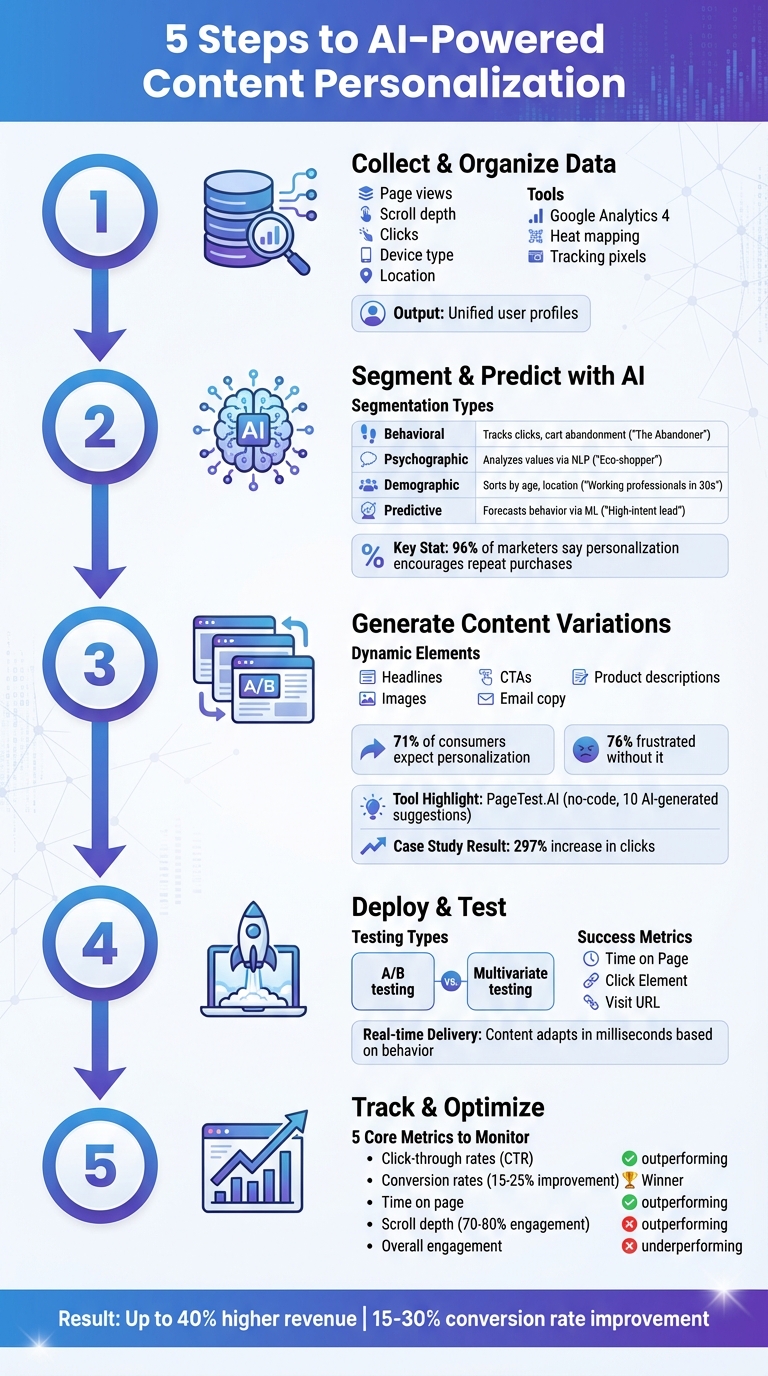
5-Step AI Content Personalization Process for Dynamic Website Optimization
How to Use AI to Personalize Customer Marketing at Scale–Erika Heald
Step 1: Collect and Organize User Behavior Data
To create effective AI-driven personalization, you need high-quality user behavior data. This data lays the groundwork for crafting personalized headlines, calls-to-action, and product recommendations that resonate with individual visitors.
Identify Key Data Sources
Start by tracking behavioral signals like page views, dwell time, scroll depth, and navigation patterns. These metrics help you understand user intent. Additionally, engagement metrics such as clicks, hover behavior, form submissions, and interactions with videos or quizzes provide deeper insights into how users engage with your site.
Contextual information is equally important. Factors like location, device type, time zone, and referral source add depth to your understanding. For B2B audiences, firmographic details – such as company size, industry, and job title – can help refine your messaging for professional users.
Leverage tools like Google Analytics 4 to collect this data. Tracking pixels can capture real-time events like “add to cart” clicks, purchases, and page views. Complement this with heat mapping tools and session recordings to see exactly where users click, scroll, or hesitate.
“User behavior gives you insight into how your website visitors act, think, and make decisions.” – Hiten Shah, CEO, Crazy Egg
Once you’ve gathered this data, the next step is to organize it for AI analysis.
Organize Data for AI Analysis
After collecting your data, focus on structuring it for AI systems. Combine information from your website, email campaigns, CRM, and mobile apps to create unified user profiles. Use tags and custom fields to categorize actions, preferences, and engagement levels, ensuring that AI can easily process and apply this data to personalize content.
Regularly clean your data by removing duplicates, updating outdated records, and standardizing attributes. Prioritize the majority of users who follow typical patterns rather than focusing on outliers. For example, between August and October 2023, Ducks Unlimited Canada used ActiveCampaign‘s conditional content features with clean, well-organized behavioral data. This resulted in a 2x increase in click-through rates within just three months.
Transparency is key when collecting data. Users are more likely to share information if they understand how it benefits them – such as receiving tailored product recommendations based on their preferences. Ensure you comply with privacy regulations by clearly explaining your data usage policies and obtaining consent before tracking begins.
Step 2: Segment Users and Predict Preferences Using AI
After organizing your data, AI can step in to identify patterns, group users into meaningful segments, and predict the type of content that will connect with each group. By analyzing these patterns, AI transforms raw data into actionable strategies for personalization.
Create Audience Segments with AI
AI uses machine learning to detect trends – like users repeatedly visiting certain product pages or ignoring specific types of content. Natural language processing (NLP) goes further by interpreting user intent. For instance, if a user searches for “eco-friendly packaging” or engages with content about sustainability, AI might classify them as an “Eco-shopper”, focusing on their values rather than just their search terms. This type of segmentation digs into the motivations behind user behavior.
AI also employs predictive modeling to map out conversion paths. For example, if users who download a particular guide often make a purchase within 48 hours, AI can automatically create a “High-intent lead” segment. These users can then be prioritized for personalized follow-ups. And the numbers back it up: 96% of marketers say personalization encourages repeat purchases, while 94% believe it drives overall sales.
| Segmentation Type | AI Analysis Method | Example Segment |
|---|---|---|
| Behavioral | Tracks clicks, cart abandonment, and site navigation | “The Abandoner” (adds items to the cart but doesn’t complete purchase) |
| Psychographic | Uses NLP to analyze values, frustrations, and motivations | “Eco-shopper” (focuses on sustainability) |
| Demographic | Sorts by age, location, or income using CRM data | “Working professionals in their 30s” |
| Predictive | Applies machine learning to forecast future behavior | “High-intent lead” (likely to convert within 48 hours) |
One of AI’s greatest strengths is its adaptability. When a user’s behavior shifts – like moving from budget shopping to browsing premium products – AI can reassign them to a new segment instantly, without requiring manual adjustments. Once these segments are in place, they can guide predictions about the content users are most likely to engage with.
Use AI to Predict Content Needs
After defining user segments, AI can predict which types of content will resonate with each group. These insights shape personalized content strategies in real time. For example, predictive intent modeling can anticipate actions like conversions, churn, or engagement within the next week.
To make these predictions accurate, AI relies on a unified dataset. A Customer Data Platform (CDP) brings together behavioral data (like clicks and page views), transactional data (purchases), and zero-party data (voluntary inputs like quiz answers) into a single view of the customer. This consolidated profile helps AI understand not just past behavior but also future needs.
For first-time visitors, AI uses factors like device type, location, time of day, and referral source to tailor content immediately. For instance, someone clicking through a LinkedIn ad on their phone during lunch might be flagged as a professional seeking quick, actionable insights, prompting AI to serve them concise and relevant content.
“AI-driven personalization isn’t about guessing what people want; it’s about using real behavior to make every interaction feel more intentional.” – Sarah Moss, AI Digital
The impact of AI-driven personalization is clear. Amazon credits 35% of its revenue to its AI recommendation engine, while Netflix reports that 80% of its watched content comes from AI-powered suggestions. Businesses implementing AI personalization often see conversion rates improve by 15–30%.
Start with the data you know best – like purchase history or email engagement – before diving into more complex behavioral signals. Give AI as much context as possible, including details like users’ job roles, key challenges, and preferred industry language. The richer the context, the better AI can predict which headlines, calls-to-action, or product descriptions will resonate with each audience segment.
Step 3: Generate Personalized Content Variations with AI Tools
Now that you’ve segmented your audience and identified their content needs, it’s time to put that strategy into action. This step focuses on creating dynamic, personalized website elements using AI tools. By leveraging a no-code interface, you can ensure your message reaches the right audience at the right moment.
Examples of Dynamic Content Elements
With user segments and content predictions in place, the next move is crafting tailored content variations. These dynamic elements – like headlines, CTAs, product descriptions, images, and email copy – adapt based on user behavior and context.
Here’s why this matters: 71% of consumers expect personalized content, and 76% feel frustrated when they don’t get it. Businesses that embrace personalization see big rewards, with fast-growing companies generating 40% more revenue through these efforts. A great example is HP Tronic, which shifted from broad demographic targeting to individualized experiences for visitors in the Czech Republic and Slovakia. This change led to a 136% increase in new-customer conversion rates in January 2026.
Use PageTest.AI for Content Personalization
PageTest.AI makes personalization simple with its no-code interface. After installing the Chrome extension and adding a single JavaScript snippet to your website (compatible with platforms like WordPress, Shopify, and Wix), you can immediately start creating variations. Here’s how it works:
- Open any live page and click “Test this Page.”
- Hover over the element you want to personalize – whether it’s a headline, button, or product description.
- Click to select it, and the AI engine will generate 10 optimized content suggestions based on conversion data.
If the suggestions don’t align with your brand voice, hit “Refresh” for new options. You can also manually edit suggestions, remove unwanted options, or add your own custom versions. Once you’ve finalized your variations, define your success metric – like “Time on Page”, “Click Element”, or “Visit URL” – to measure what works best. From there, the platform takes over, delivering personalized content to different user segments in real time.
“As a marketer I have struggled so much with AB testing… I love that you have a chrome extension, it makes it so much easier!” – Werner Geyser, Founder, Influencer Marketing Hub
One case study highlights the power of PageTest.AI: an app generation service tested two CTA button variations. The original read “Generate my app free”, while the AI-suggested version said “Make my app free and easy.” After 11,000 impressions, the AI variation drove 11 clicks versus just 2 for the original – a 297% jump in engagement. These results pave the way for real-time testing and optimization in the next step.
sbb-itb-6e49fcd
Step 4: Deploy Dynamic Content Testing and Delivery
Set Up A/B and Multivariate Tests
Start by launching your personalized content variations. Choose the elements you want to test – like headlines, CTAs, or button text – and set clear goals, such as improving click-through rates or boosting conversions. Ensure traffic is distributed evenly so each visitor only sees one version of the test.
Pick a success metric that aligns with your goals. For example, track “Time on Page” to measure engagement, “Click Element” for action-focused CTAs, or “Visit URL” to monitor whether visitors reach critical pages. The AI ensures fair traffic distribution across variations, showing each unique visitor just one version.
A/B testing works well for comparing two variations of a single element, especially when traffic is limited. On the other hand, multivariate testing lets you experiment with multiple elements – like combining different headlines, CTAs, and images – to uncover the best-performing combinations. If you’re running several tests on the same page, you can prioritize certain elements. For instance, a headline test might get more traffic than a button test if it’s marked as higher priority. The PageTest.AI dashboard simplifies this process by tracking performance and visually marking the winning variations with icons like gold trophies once statistical significance is achieved.
Once your tests are live and delivering insights, the next step is to implement the best-performing content in real time.
Deliver Content in Real-Time
When the tests identify successful variations, you can deploy them instantly. Real-time delivery ensures that visitors see the most relevant and personalized content, right when it matters. The decision engine processes multiple data points in milliseconds to adapt homepage banners, recommendations, or CTAs based on user behavior – all without needing a page refresh.
PageTest.AI monitors browsing patterns, location, and interactions in real time. For example, a first-time visitor might see a welcome offer, while a returning customer on a mobile device might encounter a tailored CTA. The AI dynamically adjusts content to match each visitor’s profile.
Every interaction – whether it’s a click, scroll, or conversion – feeds into a continuous learning system that sharpens future predictions. Background testing runs constantly, identifying top-performing variations and automatically adjusting content delivery. As David Hall, CEO of AppInstitute, shared:
“Knowing we can test every call to action and optimize our SEO efforts is very satisfying”.
Real-time updates, like dynamic pop-ups, session-specific product recommendations, or CTAs that respond to scrolling behavior, can significantly boost conversions. Machine learning ensures that personalized elements – such as carousels, banners, and CTAs – are always aligned with the freshest data. This automated process works tirelessly in the background, freeing you to focus on broader strategy while the system continuously fine-tunes performance.
Dynamic testing and real-time delivery ensure that every visitor gets a tailored experience, driving engagement and conversions based on their unique behavior.
Step 5: Track Performance Metrics and Optimize
Key Metrics to Monitor
Once you’ve launched your personalized content, it’s time to focus on the numbers that matter. Keep an eye on five core metrics to understand how users are interacting with your content variations:
- Click-through rates (CTR): This measures whether visitors are engaging with your calls-to-action (CTAs) and links. It’s one of the clearest indicators of relevance.
- Conversion rates: Track the percentage of users completing desired actions, like making a purchase or signing up. With AI-driven personalization, conversion rates often see a boost of 15–25%.
- Time on page: Longer time spent on a page suggests your content aligns well with user intent.
- Scroll depth: High engagement is reflected when users scroll through 70–80% of dynamic content.
- Overall engagement: Metrics like session duration and return visits provide a broader picture of user behavior.
For example, if mobile users show lower scroll depth compared to desktop visitors, it might be time to prioritize mobile-optimized content in your next update. Keep an eye on these metrics in real-time, using formats familiar in the U.S., such as percentages for conversion rates (e.g., 12.5%), revenue in dollars (e.g., $1,234.56), and time in minutes and seconds (e.g., 3:45).
Optimize with PageTest.AI Insights
Once you’ve gathered the data, PageTest.AI steps in to turn those numbers into actionable insights. The platform simplifies the process with color-coded visual cues: green highlights indicate content that’s outperforming your control version, while red flags underperforming variations. When a variation reaches statistical significance, you’ll see a gold trophy icon – your signal to implement the winning version.
PageTest.AI tracks all five key metrics at once, offering filters to help you zero in on the most impactful improvements. You can even customize reporting windows to analyze performance during specific campaigns or seasonal peaks. When a top-performing variation is identified, the platform provides ready-to-use recommendations, ensuring your strategy stays data-driven instead of relying on guesswork.
As Werner Geyser, Founder of Influencer Marketing Hub, shared:
“As a marketer I have struggled so much with AB testing… I love that you have a chrome extension, it makes it so much easier!”
Conclusion
Today’s audiences expect content tailored specifically to their needs, and using AI-driven personalization is one of the quickest ways to deliver that on a large scale. By following the five steps outlined here – gathering user data, dividing audiences into segments, creating content variations, running tests, and monitoring results – you can improve visitor engagement and drive more conversions.
The results speak for themselves: recent studies show that optimized call-to-action (CTA) variations powered by AI have boosted engagement by an impressive 220% to 297%. These numbers highlight how AI eliminates the guesswork and zeroes in on strategies that truly work.
Leah Messenger, Content Marketing Manager at Optimizely, emphasizes this point perfectly:
“Think of AI as a collaborative tool rather than a replacement for human creativity. Fuel it with clear guidelines, examples of successful content, and specific objectives.”
With tools like PageTest.AI, which offers a no-code interface and real-time analytics, testing and refining content has never been easier. You can quickly identify what works and implement winning variations without hassle.
Start small – focus on one high-traffic page, test a headline or CTA, and let AI-driven personalization transform engagement into measurable results. Even minor tweaks can lead to major improvements in conversions.
FAQs
What data do I need to start AI personalization?
To kick off AI personalization, you’ll need to gather data on user behavior and preferences. This information typically includes metrics like click patterns, engagement levels, demographics, and psychographics. By analyzing this data, AI tools can generate customized content tailored to individuals or specific audience segments, which can lead to better engagement and higher conversion rates.
How do I pick the best segments to personalize for?
To identify the most effective segments for personalization, start by diving into user data – this includes behavior patterns, demographics, and intent. AI-powered tools can categorize visitors into groups like personas or lifecycle stages, allowing you to deliver content that feels custom-made for them. What’s even better? These tools continuously improve segmentation by analyzing both real-time and historical data. The result? More accurate targeting that drives higher engagement and better conversion rates.
How long does it take for A/B tests to show reliable results?
The duration of an A/B test largely hinges on factors such as website traffic, conversion rates, and the specific goals of the test. To get trustworthy insights, the test needs to run long enough to collect enough data and avoid skewed interpretations. For websites with high traffic, results might become clear within just a few days. However, sites with lower traffic often need several weeks to gather the necessary data. The key is to aim for statistically significant results to ensure the findings are accurate and to steer clear of drawing early, unreliable conclusions.
Related Blog Posts
say hello to easy Content Testing
try PageTest.AI tool for free
Start making the most of your websites traffic and optimize your content and CTAs.
Related Posts

31-08-2026
 Becky Halls
Spiralyze alternatives: CRO agency or software in 2026?
Spiralyze makes an offer that’s hard to argue with. “30% lift in 90 days. No fee until we deliver.” More precisely: 10 tests, 3 wins, more than 30% lift in your first 90 days, and you pay nothing until they’ve done it. I’ll say plainly what most competitor pages wouldn’t. On risk alone, that’s a better offer than […]

31-08-2026
Becky Halls
AB Tasty alternatives: an honest comparison for 2026
AB Tasty is a strong platform with a well-liked support team, sitting at 4.4 on G2 across 418 reviews. Reviewers on TrustRadius describe it as better value than pricier AB Tasty alternatives, which in this category is a real compliment. It also has the most unusual buying process here. No published pricing, and no free […]

31-08-2026
Becky Halls
The best Optimizely alternative: a comparison for 2026
Optimizely is the most capable experimentation platform on the market. I don’t think that’s seriously disputed. Server-side testing, feature flags, personalization, statistical depth, and it all runs at genuine enterprise scale. In 2026 they’ve wrapped the whole thing in “agentic experimentation” branding and shipped an AI variation development agent, and the underlying Web Experimentation product […]