


How Search Intent Impacts Conversions

How Search Intent Impacts Conversions
 20-01-2026 (Last modified: 07-09-2026)
Matching your content to search intent is the key to turning visitors into customers. When users search, they’re telling you what they want – whether it’s information, a product, or a solution. If your content aligns with their intent, you’ll see lower bounce rates, higher engagement, and better conversions. Ignore it, and you risk losing rankings, traffic, and revenue.
Here’s the breakdown of search intent types and how search intent impacts conversions:
- Informational Intent: Users seek answers or knowledge (e.g., “how to fix a leaky faucet”). Low conversion rates but builds trust if done well.
- Navigational Intent: Users look for a specific site or page (e.g., “Spotify login”). Conversion depends on familiarity with your brand.
- Commercial Intent: Users compare options before deciding (e.g., “best CRM for small businesses”). Strong potential for conversions if content aids decision-making.
- Transactional Intent: Users are ready to act (e.g., “buy iPhone 15 Pro online”). Highest conversion rates.
Why it matters: Studies show bottom-of-the-funnel (BoFu) content converts at 4.78%, compared to just 0.19% for top-of-the-funnel (ToFu) content. Misaligned content leads to high bounce rates, low rankings, and lost opportunities.
How to get it right:
- Analyze SERPs: Check top-ranking pages for your target keyword to understand user expectations.
- Tailor Content: Match format, tone, and calls-to-action (CTAs) to the specific intent.
- Measure Performance: Track metrics like bounce rates, time on page, and conversions to refine your strategy.
When your content meets user intent, conversions naturally follow. Tools like PageTest.AI can help you optimize headlines, CTAs, and more, ensuring your pages deliver what users are searching for.
How Optimizing for Search Intent Improved Engagement by Over 250%
The Problem: When Content Doesn’t Match Search Intent
When your content doesn’t align with what users are looking for, it creates a disconnect – leading to quick exits and missed opportunities for engagement.
What Happens When You Ignore Search Intent
When users land on content that doesn’t meet their needs, they often leave immediately – this behavior is called “pogo-sticking”, where they return to the search results almost instantly. Google picks up on this pattern and interprets it as a sign that your content isn’t meeting expectations. The result? Lower rankings.
Metrics like high bounce rates and short dwell times send a clear message to search engines: your page isn’t delivering. Even if your site gets impressions through Google Search Console, a low click-through rate (CTR) suggests your title and meta description aren’t appealing to what searchers are actually after . This creates what marketers call “vanity traffic” – visitors who land on your site but aren’t the right audience for your content.
“Avoid frustrating users – negative experiences harm conversion rates.”
– Glenn Gabe, SEO Analyst
The problem isn’t just in the messaging – it extends to content format. For example, if someone searching for a product page ends up on a lengthy guide, they’ll likely leave. Similarly, pushing a sales pitch to someone seeking information creates conversion friction. Even the best-written content can fall flat if it doesn’t match what the user wants .
These user behaviors don’t just hurt your engagement – they directly impact your ability to convert visitors into customers.
The Numbers Behind Intent Misalignment
The financial cost of ignoring search intent is massive. Take this analysis from Grow and Convert: in 2026, they reviewed 64 articles for their client Geekbot and found that bottom-of-the-funnel (BoFu) content converted at 4.78%, while top-of-the-funnel (ToFu) content converted at just 0.19% – a staggering 25x difference. Even more revealing, high-intent posts received 7x less traffic than broader informational posts but still generated over 3x more conversions.
Here’s another example: Moz’s “Domain Analysis Tool” page started losing rankings when search intent shifted. Users were now searching for a “Domain Authority Checker.” By updating their content to match this new keyword, Moz regained their top spot. This case highlights how search intent evolves, and failing to adapt can mean losing valuable traffic – and revenue – to competitors.
The numbers make it clear: misaligned content not only disrupts SEO but also cuts into your bottom line.
| Intent Type | Conversion Rate | Impact of Misalignment |
|---|---|---|
| Informational | 0.19% (ToFu) | High bounce rates; loss of trust in your brand |
| Commercial | Mid-funnel | Users choosing competitors with better comparisons |
| Transactional | 4.78% (BoFu) | Direct revenue loss; wasted marketing spend |
| Navigational | Varies | User frustration; negative perception of your brand |
These stats show that failing to align with search intent doesn’t just cost you rankings – it directly impacts conversions and revenue. As Michael Shihinski from GraphicTen puts it: “Matching intent isn’t optional anymore, it’s the foundation of a successful SEO strategy”. And with 75% of users never scrolling past the first page, getting this right is essential for staying competitive.
4 Types of Search Intent and How They Affect Conversions
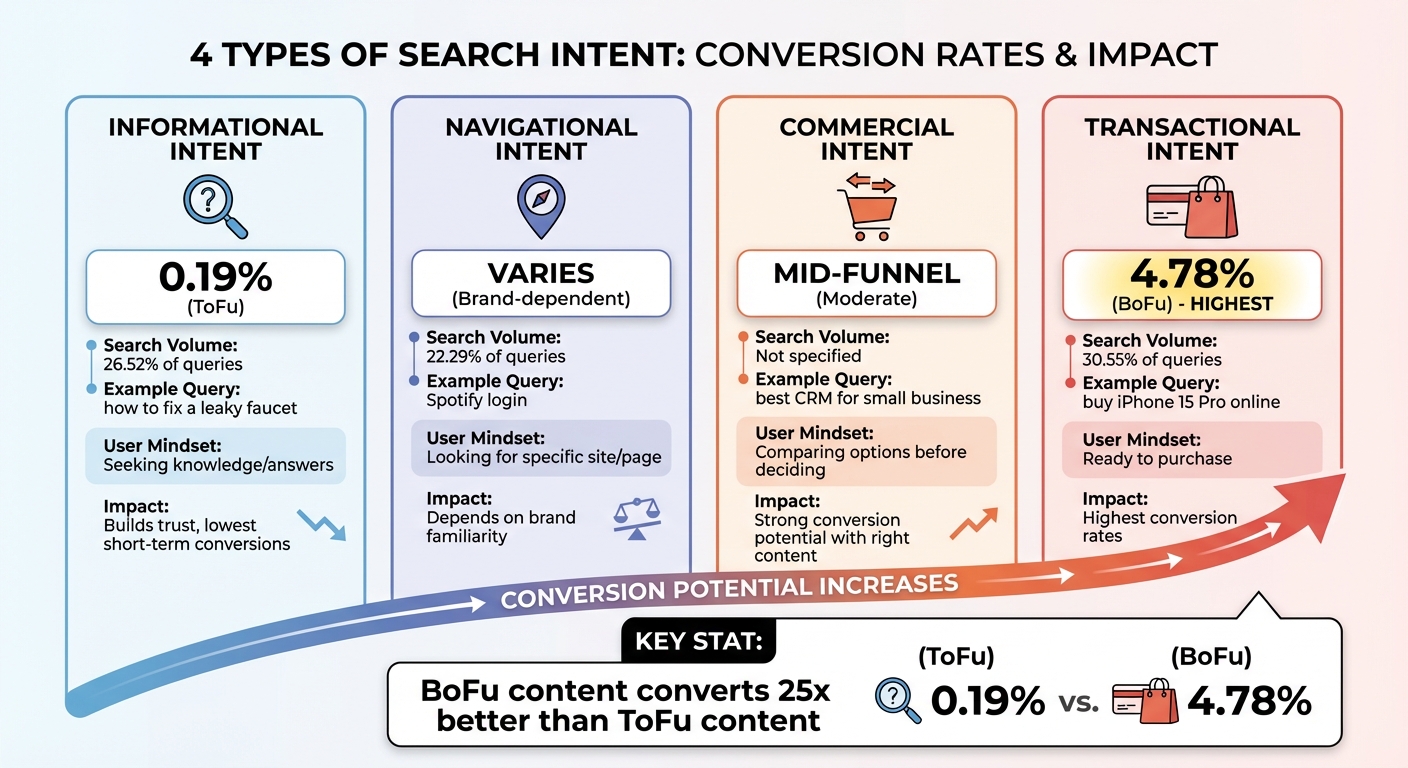
Search Intent Types and Conversion Rates Comparison
Informational, Navigational, Commercial, and Transactional Intent
Search intent can be grouped into four main categories. Informational intent is when users are seeking knowledge or answers. Think of queries like “how to fix a leaky faucet” or “what is SEO.” These searches focus on gathering information. Google’s Search Quality Evaluator Guidelines refer to this as “Know” intent.
Navigational intent happens when users already know where they want to go but use a search engine to get there. For example, searches like “Spotify login” or “Moz homepage” fall into this category.
Commercial intent, sometimes called commercial investigation, is part of the research phase. These users are comparing options, searching for terms like “best wireless headphones” or “best CRM for small business” to make an informed decision before committing.
Transactional intent signals that users are ready to act. Queries such as “buy iPhone 15 Pro online” or “order organic green tea” clearly indicate purchase intent, showing that these users are at the bottom of the funnel and prepared to convert.
“If your CTA doesn’t match your visitor’s conversion intent, it doesn’t matter what you split test on your landing page – it won’t work.”
– Johnathan Dane, Founder, KlientBoost
Understanding these different types of intent is crucial for aligning your content and calls-to-action (CTAs) with the user’s mindset. Let’s dive into how each type of search intent influences conversions.
Which Search Intent Types Convert Best
Not all search intents are created equal when it comes to driving conversions. Transactional intent leads the pack, delivering the highest conversion rates. These users have already made their decision and are simply looking for the best place to complete their purchase. In a study analyzing 10,000 queries, transactional searches appeared in 30.55% of search engine results pages (SERPs).
Commercial intent comes in second. These users are still comparing options but are closer to making a decision, making them more likely to convert than those with purely informational queries.
“The higher the intent of the visitor, the more momentum there is throughout the marketing and sales funnel. This is what ultimately leads to a sale.”
– Johnathan Dane, Founder, KlientBoost
Informational intent, on the other hand, has the lowest conversion rates in the short term. These searches, which account for 26.52% of queries, represent users in the early stages of their journey. They’re gathering knowledge but aren’t ready to take action yet.
Navigational intent falls somewhere in the middle. Conversion rates for these searches depend heavily on whether the user is already familiar with the brand or is visiting for the first time. In the same study, navigational searches made up 22.29% of queries.
sbb-itb-6e49fcd
How to Match Your Content to Search Intent
Step 1: Identify Search Intent Using SERP Analysis and Data Tools
The best way to figure out search intent is to see what Google already favors. Open an incognito browser, search for your target keyword, and analyze the top 10 results. Pay attention to the “Three Cs” – Content Type (e.g., blog posts, product pages, tools), Content Format (e.g., how-to guides, listicles, reviews), and Content Angle (e.g., “for beginners” or “updated for 2024”) .
Look closely at SERP features, as they reveal intent clues. For example:
- Featured snippets suggest users want quick, factual answers.
- Shopping carousels point to transactional intent.
- “People Also Ask” boxes highlight extra questions your content could address .
“Fail to give searchers what they want, and your chances of ranking are slim to none.”
– Mateusz Makosiewicz, Marketing Researcher, Ahrefs
Keyword modifiers also provide intent signals. Phrases like “how to” or “what is” suggest informational intent, while terms like “best” or “vs” lean toward commercial intent. Words like “buy” or “discount” clearly indicate transactional searches .
A great example of aligning content with intent comes from Ahrefs. In 2023, they revamped their “backlink checker” landing page by adding a free tool instead of just describing the product. This adjustment matched what users were looking for and led to a staggering 516% traffic increase in under six months.
Once you’ve nailed down how search intent impacts conversions, the next step is tailoring your content to meet those expectations.
Step 2: Adjust Your Content with PageTest.AI
After identifying the intent, it’s time to tweak your content to match user needs. For informational searches, try headlines that promise clear, actionable answers. For commercial intent, use comparison tables or structured reviews to guide decision-making. And for transactional queries, refine CTAs and product descriptions to make the buying process as smooth as possible.
PageTest.AI makes this process seamless. Without needing any coding skills, you can select elements like headlines, CTAs, button text, or product descriptions to optimize. The platform generates AI-powered variations tailored to your goals and tests them with visitors to find the best-performing version.
Here’s an example: In early 2025, Zach Paruch from Semrush ran a three-week A/B test on a blog pop-up seen by over 200,000 users. By switching the copy from a value-driven message to one leveraging FOMO, they boosted conversion rates by 17.5%.
You can also create separate pages for different search intents. For instance, a “What is CRM?” page targets informational queries, while a “Best CRM Tools” page serves commercial intent. Another experiment by Omnisend’s Paulius Zajanckauskas replaced a hero image with a product video on a landing page. This simple change resulted in a 21% increase in sign-ups from 27,000 users in just two weeks.
Once your content is optimized, the focus should shift to tracking its performance and making adjustments based on the data.
Step 3: Measure Results and Make Improvements
To evaluate how well your content is performing, track metrics that align with its intent. For informational content, monitor time on page and scroll depth to see if users are engaging. For commercial and transactional content, focus on conversion rates, click-through rates, and bounce rates.
PageTest.AI simplifies this by automatically tracking these metrics, helping you identify which variations drive the most engagement and conversions. For reliable results, run tests for two to three weeks to gather enough data. If you notice a high bounce rate, it might mean your content isn’t meeting user expectations.
Use these insights to fine-tune your strategy and keep improving your content.
How Search Intent Impacts Conversions – Conclusion
Grasping how search intent impacts conversions is more than just an SEO move – it’s the backbone of turning visitors into loyal customers. When your content aligns with what users are actively searching for, you not only lower bounce rates but also build credibility and guide potential customers seamlessly through their decision-making process. Consider this: bottom-of-the-funnel content boasts a conversion rate of 4.78%, compared to a mere 0.19% for top-of-the-funnel content.
“Search intent isn’t a buzzword. It’s the foundation of effective SEO strategy.”
– Michael Shihinski, Founder, GraphicTen
To stay ahead, analyze SERPs, tailor your content accordingly, and measure the results. Tools like PageTest.AI simplify the process by enabling you to test headlines, CTAs, and content variations without needing coding skills. It automatically tracks engagement metrics, helping you identify which version resonates most with your audience. This data-driven approach ensures you’re always a step closer to meeting user expectations.
Take it further by auditing high-traffic pages with lots of impressions but low click-through rates. Adjust these pages to better align with user intent and use performance data to refine your strategy. Keep in mind, search intent isn’t static – it shifts over time. Regularly revisiting and optimizing your content is key to staying relevant.
Ultimately, the difference between content that ranks and content that converts lies in one thing: delivering exactly what users are seeking. With the right mindset and tools, you can bridge this gap and turn traffic into tangible results. When every part of your content serves the searcher’s intent, conversions naturally follow.
How Search Intent Impacts Conversions – FAQs
How do I identify the search intent behind a keyword?
Understanding search intent means figuring out what a user is truly looking for when they type in a keyword. Generally, search intent falls into four main categories: informational (seeking knowledge or answers), navigational (trying to find a specific website), transactional (ready to make a purchase or take action), and commercial investigation (researching products or services before deciding to buy).
To pinpoint the intent behind a search, start by examining the search results. Spotting ads, product listings, or “Buy now” buttons? That’s a strong sign of transactional or commercial investigation intent. Similarly, keywords like “buy,” “price,” or “best” often indicate someone is ready to act or compare options. On the flip side, if the results include guides, tutorials, or “How-to” snippets, the intent is likely informational. Checking the top-ranking pages is another great clue – blog posts and educational content usually align with informational intent, while product pages are geared toward transactional searches.
Once you understand the intent, you can craft content that fits the user’s needs. For instance, if you’re targeting an informational keyword, focus on creating in-depth, helpful articles. If the keyword is transactional, make sure your product descriptions are clear and include compelling calls-to-action. Tools like PageTest.AI can help you fine-tune your content to match user intent, boosting both engagement and conversions.
What happens if your website content doesn’t match search intent?
When your content doesn’t match what users are searching for, it can create a frustrating experience. Visitors leave quickly because they don’t find what they need, which means higher bounce rates and fewer conversions. On top of that, search engines favor content that meets user intent, so a mismatch here can hurt your rankings. Over time, this can lead to missed opportunities, lower engagement, and even lost revenue.
By focusing on search intent, you can craft content that connects with your audience, encourages them to stay on your site longer, and motivates actions like making a purchase or signing up.
How does search intent influence website conversion rates?
Search intent is all about understanding why someone is searching for something. It’s the motivation behind a query, and it has a big impact on conversion rates. Generally, search intent falls into four main categories:
- Informational: These are curiosity-driven searches, like “what is search intent.” People are looking for knowledge but aren’t necessarily ready to make a purchase.
- Navigational: Here, users are trying to find a specific site or page, like “PageTest.AI login.” They already know what they’re looking for but might still be in the research phase.
- Commercial: These queries show users are weighing their options, such as “best CRO tools.” They’re interested but not quite ready to commit.
- Transactional: These are the golden ticket for conversions – searches like “buy PageTest.AI subscription” indicate the user is ready to make a purchase.
Each category ties into a different stage of the buyer’s journey, from initial awareness to making a decision. And as intent gets closer to transactional, conversion rates naturally climb. For example, informational searches might not lead to immediate sales, but they’re great for building trust and brand recognition. Navigational queries show higher engagement since users already know your brand, but they’re often still exploring. Commercial intent, on the other hand, signals serious interest, while transactional intent delivers the highest conversions because users are primed to act.
To make the most of this, your content needs to match the user’s intent at every stage. Tools like PageTest.AI can make this easier by offering rapid A/B and multivariate testing. You can tweak elements like headlines and CTAs to match specific intent categories, turning intent-driven traffic into tangible revenue. To go deeper on search intent itself, 3way has a dedicated breakdown.
Related Blog Posts on how Search Intent Impacts Conversions
say hello to easy Content Testing
try PageTest.AI tool for free
Start making the most of your websites traffic and optimize your content and CTAs.
Related Posts

31-08-2026
 Becky Halls
Spiralyze alternatives: CRO agency or software in 2026?
Spiralyze makes an offer that’s hard to argue with. “30% lift in 90 days. No fee until we deliver.” More precisely: 10 tests, 3 wins, more than 30% lift in your first 90 days, and you pay nothing until they’ve done it. I’ll say plainly what most competitor pages wouldn’t. On risk alone, that’s a better offer than […]

31-08-2026
Becky Halls
AB Tasty alternatives: an honest comparison for 2026
AB Tasty is a strong platform with a well-liked support team, sitting at 4.4 on G2 across 418 reviews. Reviewers on TrustRadius describe it as better value than pricier AB Tasty alternatives, which in this category is a real compliment. It also has the most unusual buying process here. No published pricing, and no free […]

31-08-2026
Becky Halls
The best Optimizely alternative: a comparison for 2026
Optimizely is the most capable experimentation platform on the market. I don’t think that’s seriously disputed. Server-side testing, feature flags, personalization, statistical depth, and it all runs at genuine enterprise scale. In 2026 they’ve wrapped the whole thing in “agentic experimentation” branding and shipped an AI variation development agent, and the underlying Web Experimentation product […]